



WhatsApp chat exports record the device's local wall-clock time at the moment each message was sent or received, not a timezone identifier. That means an export alone cannot guarantee an accurate UTC timeline if the phone changed time zones during the conversation. If timestamps look off or you need a defensible timeline, the fix starts with your device settings and backups, not the export file itself.
TL;DR:
- Plain text exports and WhatsApp Web show local wall clock times without a timezone, so they cannot establish UTC after travel or clock changes.
- Enable automatic date, time, and time zone settings on the device, then export again; preserve an untouched copy before changing settings.
- Device databases and some server backups may retain epoch timestamps, which are easier to normalize than text exports; check that offsets survive conversion.
- Without a clue, 03/04 could mean March 4 or April 3; verify date formats before relying on timestamps for billing, audits, or evidence.
- For legal or research timelines, compare device backups, system logs, and copies from other devices, and document each assumption instead of guessing offsets.
Table of Contents
- How WhatsApp writes timestamps into export files
- Why a missing timezone creates real timeline problems
- Step-by-step checks and fixes before you export
- Rebuilding a reliable timeline when timezone data is missing
- How Mastros' browser-based export tools help, and where they stop
- When a quick fix is enough versus when you need forensic rigor
- A privacy-first option for controlled WhatsApp Web exports
- FAQ
- Sources
How WhatsApp writes timestamps into export files
When you tap Export Chat in WhatsApp, the app pulls timestamps straight from the phone's clock at export time and writes them as plain local time, with no zone marker attached. A chat exported from WhatsApp Web behaves the same way, since the Web interface mirrors your signed-in device's locale and time settings rather than storing anything independently.
Not every WhatsApp-related file behaves identically, though:
- Plain text (.txt) exports show device-local wall-clock time with no timezone field at all.
- WhatsApp Web sessions inherit the time settings of whatever device you're signed in on, so a laptop in a different zone than your phone can display times that look inconsistent.
- Device database backups, such as msgstore.db on Android, sometimes store timestamps as unix epoch values, which are timezone-agnostic by nature and far easier to normalize later.
- Cloud or server-side backups occasionally retain more structured timestamp data than a simple chat export, according to WhatsApp's own backup guidance.
If you have a choice, an export format with epoch or UTC fields is worth more than a tidy-looking text file, and following privacy-first journal export steps ensures your data stays secure throughout the process.
Why a missing timezone creates real timeline problems
A text export with no zone metadata leaves you unable to reconstruct an absolute UTC timeline on its own, and the gap gets worse if the phone's time zone changed partway through the conversation, say during travel or a daylight saving switch. According to forensic analysis from MessagingForensics, exported timestamps reflect the phone's local time at export, and without an outside reference there's no reliable way to map them back to UTC.
A single date field without a day value over 12 is genuinely ambiguous: forensic reviewers can't tell whether "03/04" means March 4 or April 3 without another clue, such as an AM/PM marker or a date elsewhere in the file where the day exceeds 12.
That ambiguity has consequences beyond mild confusion:
- Messages can appear misordered when two devices with different local times are merged into one timeline.
- Day counts and date ranges can come out wrong, which matters for anything billed or scheduled by date.
- A chat log used as evidence or for an audit trail loses credibility if the date format wasn't verified first.
Step-by-step checks and fixes before you export
Before you trust any WhatsApp export, run through a short sequence of checks. Most timestamp problems trace back to one of three things: a misconfigured device clock, an export pulled from the wrong source, or a missing corroborating record.
- Check your device's date and time settings. Turn on Automatic date and time and Automatic time zone, which is exactly what WhatsApp recommends when message timestamps look wrong. Some phones also offer a "set time zone based on location" toggle, which is worth enabling if you travel often.
- Re-export from the corrected device, or pull from a backup instead. A fresh export after fixing device settings resolves the most common cause of skewed timestamps. If that's not possible, compare a cloud backup or the device database against the text export, since those can carry epoch-based timestamps that text exports don't.
- If the export already exists and can't be redone, gather corroborating sources. A second copy of the chat on another device, a server-side backup, or even carrier logs can help you anchor the timeline. Write down which assumptions you made and why, so anyone reviewing the file later can follow your reasoning.
Pro Tip: Before changing any device setting, export a copy of the chat as-is. That untouched original becomes your reference point if later corrections need to be checked against the source.
Rebuilding a reliable timeline when timezone data is missing
When the stakes are higher, say a workplace dispute or a research project, your best move is to favor export paths that carry epoch or UTC fields over plain text exports. Device database backups and some server-side exports do this; a quick way to spot one is to look for a long numeric string (an epoch timestamp) sitting next to the message instead of a formatted date.
Telegram's own export schema is a useful point of comparison here. Telegram's JSON and HTML exports can include ISO 8601 dates and unix timestamps, which removes most of the ambiguity that plain WhatsApp text exports carry. That said, even Telegram exports aren't immune to data loss: a documented parser bug shows that some HTML export tools historically dropped numeric UTC offsets during parsing, turning a precise timestamp into a naive local one. The lesson applies to any export format: check that the offset or epoch value survived the conversion, not just that it exists in the source.
When only naive local times are available, document the timezone you believe was active at export time and apply that offset consistently rather than guessing case by case.
| Export source | Typical timestamp format | Timezone data retained |
|---|---|---|
| WhatsApp text export (.txt) | Local wall-clock time | No |
| WhatsApp Web session | Local wall-clock time | No |
| Device database (msgstore.db) | Unix epoch (varies by build) | Often |
| Telegram JSON/HTML export | ISO 8601 or unix epoch | Yes, when parsed correctly |
For a technical reconstruction, locate any epoch fields in a device backup first, cross-reference device or system logs for corroborating timestamps, and compare the same conversation across multiple devices before settling on a single normalized timeline.
How Mastros' browser-based export tools help, and where they stop
Our WhatsApp Scraper runs entirely inside your browser and exports what WhatsApp Web already shows you, directly to CSV, JSON or JSONL, without uploading anything to our servers. That local-only approach gives you a repeatable export you control from start to finish.
- You choose the date range and how far back to scroll, which keeps repeated exports consistent for comparison.
- You pick which media types to pull alongside the chat, so a run can be scoped to exactly what you need.
- Exports reflect only what your signed-in session displays, so we never invent a timezone field that WhatsApp itself doesn't record.
That last point matters: a browser exporter can make your workflow more consistent, but it can't add metadata the platform never generates in the first place.
When a quick fix is enough versus when you need forensic rigor
For a personal backup or switching phones, enabling automatic time settings, re-exporting, and noting your assumptions is usually plenty. For anything destined for a legal proceeding or academic research, you'll want backups, device logs and corroborating server records gathered before you draw conclusions from a single file. Either way, keep your original export untouched and write down every normalization step you apply.
— Elias Mahdavi
A privacy-first option for controlled WhatsApp Web exports
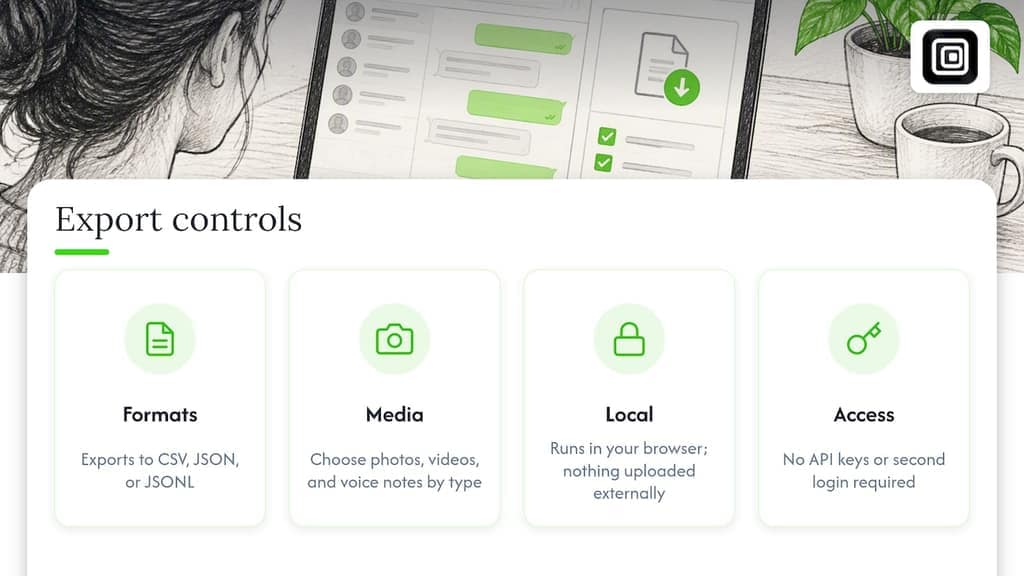
If you're pulling chat history or media out of WhatsApp for research, recruiting or simply archiving a group before switching phones, our WhatsApp Scraper exports group members, chat messages, and your contact list straight to CSV, JSON or JSONL, with no API keys and no second login required. Media downloads let you pick photos, videos and voice notes by type and set how far back a run scrolls, which keeps repeat exports consistent when you're tracking a timeline over weeks or months.
Everything runs locally in your browser session, nothing is uploaded to external servers, and nothing gets automated: the tool reads what your own WhatsApp Web session already displays and saves it to a file you control. Subscription plans are available for the tool, each unlocking a larger export volume; current details are listed at Mastros.
FAQ
How do I fix the inaccurate date and time on WhatsApp?
Check your device's clock settings and enable Automatic date and time along with Automatic time zone, which is the fix WhatsApp itself recommends. Once corrected, re-export the chat so the new timestamps reflect the right local time going forward.
Can I download my entire WhatsApp chat history?
WhatsApp's native Export Chat feature works but caps out around a limited message count, and it counts backward from your most recent messages. A browser-based tool like our WhatsApp Scraper lets you choose how far back a run reaches, which helps when you need a longer or more complete history.
Can I know if someone is checking my last seen on WhatsApp?
No, WhatsApp doesn't provide a way to see who has viewed your last seen status or profile information. This is a privacy feature built into the platform and isn't something an export or third-party tool can reveal.
How to send automatic messages on WhatsApp on time?
WhatsApp itself doesn't include built-in scheduled or automated messaging for personal accounts. Our WhatsApp extension is read-only by design: it exports data you can already see, but it never sends messages or automates outreach.