



Export means pulling a complete, server-generated copy of your chat history through the platform's own tool. Scraping (or extraction) means capturing what your logged-in browser session already displays, selectively and in a structured format. Use official export for backups and compliance records; use a browser-based extraction tool when you need clean, filtered data for analytics or a CRM. Either way, check retention policies first, since deleted messages usually cannot be recovered by any method.
TL;DR:
- Export methods provide a comprehensive, platform-generated backup but are slow and limit filtering options, with WhatsApp capped at around 40,000 messages.
- Scraping offers faster, targeted data extraction from your current view, often in CSV or JSON formats, but may omit media files and is limited by what is displayed in the interface.
- Retention policies, especially for Microsoft Teams, can delete messages permanently before you can export or scrape, making timing crucial for data retrieval.
- ChatGPT's official export process can take up to seven days, whereas local tools can capture structured data within minutes on your own machine.
- Using browser-based extraction tools like Mastros' extensions ensures structured, privacy-first chat data collection without uploading to third-party servers.
Table of Contents
- Scrape vs Export Chats: The Trade-Offs at a Glance
- What Do "Export" and "Scrape" Actually Mean?
- WhatsApp: What Export Covers and Where It Falls Short
- Microsoft Teams: Retention Rules Change Everything
- ChatGPT and AI Chats: Why Official Export Takes So Long
- Matching the Method to the Job
- Privacy and Compliance Checks Before You Extract Anything
- How to Choose: A Quick Decision Checklist
- Why Browser-Local Extraction Is Often the Right Compromise
- Mastros: Privacy-First Exports for Structured Chat Data
- Sources
- FAQ
Scrape vs Export Chats: The Trade-Offs at a Glance
Both routes get you your own chat data, but they optimize for different jobs. Export favors completeness and legal defensibility. Scraping favors control, structure, and speed when you only need part of the conversation.
- Official export (WhatsApp, Teams, ChatGPT): All-or-nothing scope, native formats (ZIP, JSON), minimal skill needed, but slow and hard to filter.
- Browser extraction/scraping: Selective date ranges, structured CSV/JSON/JSONL output, faster for targeted jobs, but limited by what the interface currently renders.
- WhatsApp: Export caps out around 40,000 messages; extraction tools let you choose the window.
- ChatGPT: Official export can take days; local exporters return data in minutes but must pace requests.
- Teams: Retention policies can erase messages before either method ever sees them.
What Do "Export" and "Scrape" Actually Mean?
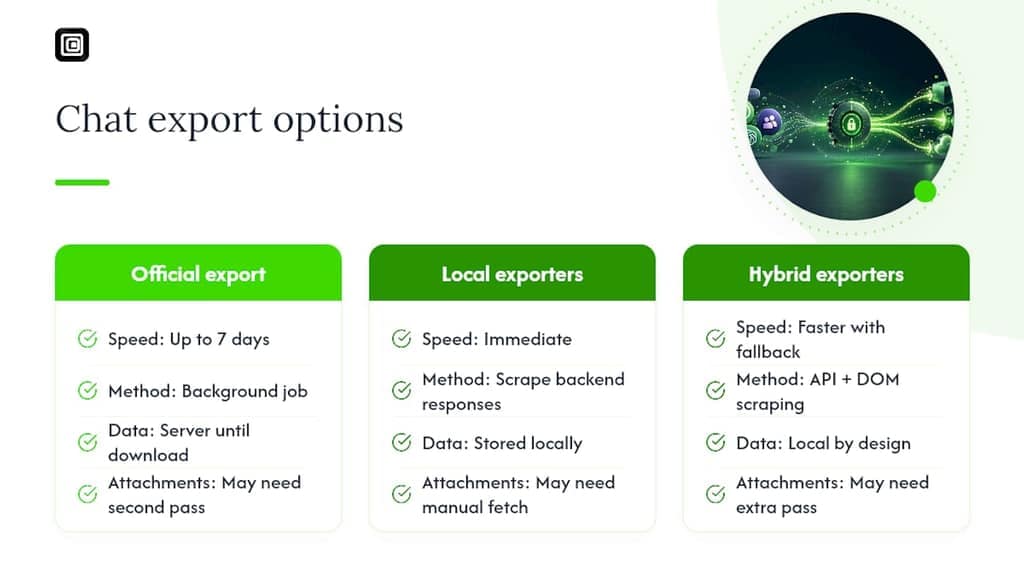
An official export is a file the platform builds for you on request, usually a ZIP or JSON bundle containing everything the platform decides to include. It's thorough by design but rigid: you take the whole export or nothing, and processing can take anywhere from seconds to several days depending on the service.
Scraping, or extraction, works differently. A script, browser extension, or manual process reads data your account can already see, through the Document Object Model (DOM) or an authenticated API call, and saves only what you ask for. This is where terminology gets muddy: "chat data extraction" is the more accurate industry term, since responsible tools aren't stealing anything, they're reading your own screen.
Timestamps and message IDs usually survive both methods. Attachments and voice notes are the more common casualty, especially in scraped data if a tool doesn't handle media downloads separately from text.
WhatsApp: What Export Covers and Where It Falls Short
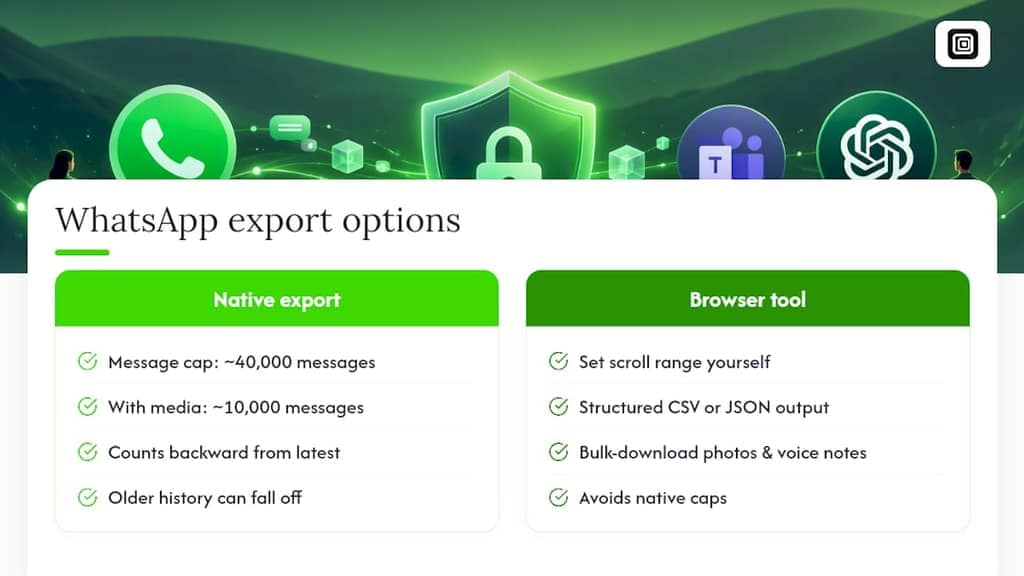
WhatsApp's built-in Export Chat (found under a conversation's menu) hands you a .txt file, or a ZIP with media if you include it, but caps at roughly 40,000 messages and only 10,000 when media is attached. It also counts backward from your most recent message, so older history quietly falls off the edge on long-running group chats.
WhatsApp has also rolled out privacy controls, including Advanced Chat Privacy settings that can block chat exports outright when a chat participant has enabled them.
This is where a browser-based export tool for WhatsApp Web data earns its place: you set the scroll range yourself, pull structured CSV or JSON instead of a flat text file, and bulk-download photos or voice notes without hitting the native cap. A well-built tool never reveals hidden phone numbers and never touches the WhatsApp Business API, which keeps the process read-only and safe for group admins pulling contact lists.
Microsoft Teams: Retention Rules Change Everything
Teams handles exports differently depending on whether you're a personal user or part of an organization. Admins can export or delete Teams data through compliance tools, typically producing structured files for eDiscovery or legal hold.
The catch is timing. Organizational retention policies can permanently delete messages before anyone requests an export, and once that deletion runs, the content is gone for every participant, not just the sender. Microsoft's own retention documentation confirms there's no recovery path once a policy sweep completes.
For compliance-sensitive Teams data, that means export timing matters more than export method. Regular, scheduled exports beat waiting until you need the record. Individual scraping isn't a realistic substitute here. Teams data typically requires admin-level or compliance tooling, not a browser extension pointed at your own login.
ChatGPT and AI Chats: Why Official Export Takes So Long
Requesting your data from ChatGPT's settings triggers a background job that can take up to seven days to process, and the resulting download link expires shortly after it's ready. That delay is fine for a one-time archive. It's useless if you need a conversation today.
This gap is exactly why local exporters exist. Tools like scrapemychats capture the same backend responses ChatGPT's interface uses, then organize them into structured folders with JSON and Markdown files plus a searchable local viewer. Others, like the browser-ai-chat-exporter project, combine API calls where available with DOM scraping as a fallback, pacing requests with backoff logic so the account doesn't get throttled. Both approaches keep the data on your machine instead of routing it through a third party. Attachments and generated files (code outputs, images) are the part most likely to need a second pass, since they don't always travel cleanly with text-only exports.
Matching the Method to the Job
Pick the simplest method that fully covers your actual goal, not the most powerful one available.
- Backup or legal record: Use the platform's official export. Schedule it regularly, expect a ZIP or JSON file, and plan to post-process it into something searchable.
- Structured data for analytics or CRM: Use a browser-local extraction tool. It filters by date, keeps everything on your device, and outputs a format a spreadsheet or database can read directly.
- Recurring or high-volume jobs: A script or headless tool makes sense, but only with rate-limit handling built in. Established projects implement exponential backoff and resumable progress so an interrupted run doesn't force a restart from zero.
- One-off, tiny jobs: Manual copy-paste still works, but it's fragile, easy to miss messages in a virtualized scroll view, and impossible to audit later.
Pro Tip: Before trusting any export or extraction tool with your full history, run it on a small sample chat first and check the output file for missing timestamps, broken media links, or truncated messages. A five-minute test catches problems a 10,000-message run would only reveal after the fact.
Privacy and Compliance Checks Before You Extract Anything
Before pulling someone else's conversation, check your organization's data-handling policy and the privacy law that applies where you and the other participants are located. Rules on consent and retention vary by jurisdiction, and "I can see it in my browser" doesn't automatically mean you're clear to extract it for a business purpose.
Retention policies are a one-way door. If a platform's policy has already deleted a message server-side, no export or scraping tool can bring it back.
Once you have the data, treat it like any other sensitive file: store exports encrypted, limit who can access the file, and avoid uploading raw chat exports to third-party servers unless everyone involved has agreed to it. A browser-local extraction pattern that never leaves your device sidesteps most of this risk by design.
How to Choose: A Quick Decision Checklist
Run through these before picking a method:
- What's the goal? Legal backup favors official export; a CRM import or research dataset favors extraction.
- Whose account is it? Personal accounts can self-serve exports; enterprise data usually needs admin or compliance tools.
- How old is the data? If retention policies may have already run, export now rather than later.
- Are attachments involved? Confirm whether your chosen method downloads media separately or skips it.
- What's your technical comfort level? A browser extension needs no coding; a script-based workflow does.
Three quick action plans: for compliance backups, request the platform's official export on a recurring schedule; see how AI in Recruitment uses extracted chat data to improve workflows. For structured data work, install a browser extension for chat data extraction, set your date range, and export to CSV or JSON. For high-volume automation, build a script with rate-limit handling and test it on a small chat first.
Why Browser-Local Extraction Is Often the Right Compromise
Official exports were designed for compliance teams, not for someone who needs a clean spreadsheet of last quarter's leads. That gap is real, and it's why extraction tools exist at all. A browser-based approach that reads your own session, without a second login or an uploaded credential, gives you structured data without handing your chat history to another company's server. I reach for that option whenever the job is selective rather than total, and for a backup that has to hold up legally, I still default to the platform's own export first.
— Elias Mahdavi
Mastros: Privacy-First Exports for Structured Chat Data
Mastros builds Chrome extensions that run entirely inside your browser, reading only what your signed-in WhatsApp Web or Telegram session already shows and saving it to CSV, JSON, or JSONL. Nothing uploads to a Mastros server, no API keys or second login required, and the extensions never send messages or automate anything on your account.
The Telegram Scraper exports group members, messages, and mutual groups, plus bulk media by type and date. The WhatsApp Scraper exports group members, chat messages, and your contact list, with hidden phone numbers never revealed. Growth teams, recruiters, and researchers use it to get past WhatsApp's roughly 40,000-message export ceiling. Start with the free plan at Mastros and run a small export before scaling up to Pro or Scale.
Sources
FAQ
What Does It Mean When It Says "Export Chat"?
It means the platform is generating a file, usually a text or ZIP archive, containing the messages and media from that conversation. It's a one-time snapshot, not a live sync, so anything sent after the export finishes won't be included.
Will People Know if I Export a Chat?
No. Exporting a chat is a local, silent action on most platforms, including WhatsApp and ChatGPT, and no notification is sent to other participants. Browser-based extraction tools work the same way, since they only read what your own session displays.
Can You Export a Chat Conversation?
Yes, most major platforms offer a native export option: WhatsApp's Export Chat, Teams' admin-level export tools, and ChatGPT's data export request, which can take up to seven days to process. For more control over format and date range, a browser extension is usually faster.
What Does Scraping Mean in WhatsApp?
Scraping WhatsApp typically refers to a browser extension or script reading the messages, contacts, or media already visible in your logged-in WhatsApp Web session and saving them into a structured file. Tools like the WhatsApp Scraper do this without an API key, without messaging automation, and without exposing hidden phone numbers.
Recommended
- Privacy-First Chat Data Extraction: A Practical Guide
- Top 4 chrome extension whatsapp chat exporter alternatives 2026
- WhatsApp Export Guides: Contacts, Chats, Media
- Top 5 Chat Exporter for Teams Alternatives 2026