



On-device data processing means running collection, filtering, analysis, or inference on the user's device rather than sending raw data to a remote server. As a Google engineer explains, it keeps sensitive data on the device, cuts cloud round-trips of 200ms or more to under 10ms locally, and works offline. Below we cover architecture, techniques, runtimes, risks, and developer tradeoffs.
TL;DR:
- Start with quantization after training; choose quantization aware training if accuracy drops too far, and test each step on representative evaluation data.
- Benchmark latency and battery on actual target devices; unsupported operators may fall back to the CPU, increasing delays and power use.
- Keep sensitive, offline, or under 10 millisecond tasks local; let a small model handle common cases and send difficult inputs to a larger cloud model.
- The studied federated method cut communication costs by at least 2.9 times versus FP32 at similar accuracy, but requires compatible hardware.
- Use isolation provided by hardware, such as trusted execution environments, to protect shipped models; software obfuscation alone cannot prevent theft, hardware attacks, or reverse engineering.
Table of Contents
- How does on-device data processing work under the hood?
- Which techniques make models small enough to run on a device?
- Which runtimes and frameworks make on-device AI practical?
- How do privacy and security change when the model lives on the device?
- When should work run locally, in the cloud, or both?
- What should you check before shipping an on-device feature?
- Where does on-device processing shine, and where does it fall short?
- What do the security and FP8 studies tell us?
- Start with one measurable pilot
- Local exports from the browser, no server in the middle
- FAQ
- Sources
How does on-device data processing work under the hood?
Think of the stack as several layers. At the top sits the input interface: a camera frame, a microphone buffer, a sensor reading, or a screen the user is already looking at. Next comes the model artifact, a packaged file such as a .tflite, a Core ML bundle, or an ONNX-derived format. Below that, a runtime loads the artifact and executes it. At the bottom, hardware does the math and, ideally, isolates it.
The runtime carries more responsibility than most teams expect. It converts or validates the model, manages memory, picks a backend (CPU, GPU, or an NPU where one exists), and dispatches each operator to whichever backend supports it. When an operator has no accelerated kernel, it falls back to the CPU, and that fallback is often where latency and battery quietly go wrong.
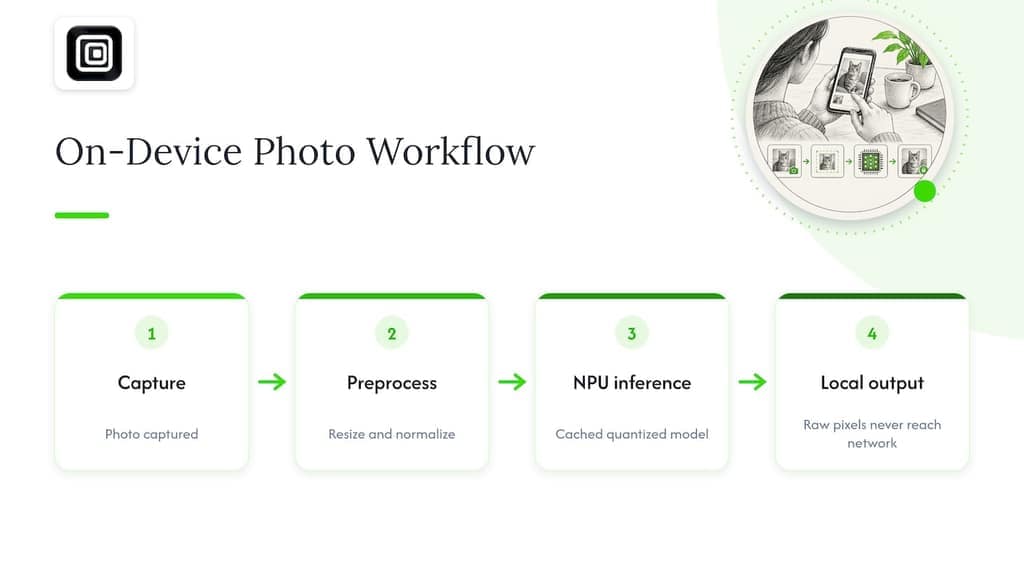
A concrete workflow shows how the layers connect. A user snaps a photo. The app resizes and normalizes the image (preprocessing). The runtime loads a cached, quantized classifier and runs inference on the NPU. The app then renders the label locally, and the raw pixels never touch the network. Google's engineer also frames on-device processing as a spectrum, not a switch: realistic deployments balance model size, battery life, and accuracy, and often need NPUs or TPUs plus techniques like quantization and pruning to avoid draining the battery.
Which techniques make models small enough to run on a device?
Several techniques do most of the work, and they stack.
- Post-training quantization converts trained weights to lower precision (for example, 8-bit integers) with no retraining. It is the fastest win and a good first experiment.
- Quantization-aware training (QAT) simulates low precision during training so the model learns to tolerate it. Choose it when post-training quantization costs too much accuracy.
- Pruning removes weights or whole structures that contribute little to the output, shrinking compute and memory.
- Distillation trains a small "student" model to mimic a larger "teacher," trading some capability for a much lighter footprint.
Quantization is also reaching into training itself. Research on FP8 on-device training in federated settings found that 8-bit floating point can cut communication costs by at least 2.9x versus an FP32 baseline for similar model accuracy under the studied method. That suggests low-precision training and quantized communication are viable on constrained devices, provided the hardware supports the format.
That caveat matters. Support for 8-bit formats varies widely across chips, so a technique that flies on one phone may crawl on another. Always measure accuracy on a representative evaluation set after each compression step, because small drops compound when you combine pruning, quantization, and distillation.
Pro Tip: Apply one technique at a time and record accuracy, latency, and battery after each step, so you know exactly which change caused a regression.
Which runtimes and frameworks make on-device AI practical?
A good runtime absorbs the messy parts: conversion, quantization helpers, a model catalog, hardware acceleration, and model management. You rarely want to write those yourself.
Examples show the range. Foundry Local ships inside your application as an end-to-end local AI solution. Microsoft describes a lightweight runtime with roughly 20 MB of app size overhead, a curated catalog of optimized models, automatic hardware acceleration, and smart model management. Inference runs locally, so application data never has to leave the device. Related Microsoft material notes that local runtimes can download models on first use and cache them, and that they target single-user inference rather than server-style multi-user serving.
LiteRT is Google's on-device framework. It handles model conversion, quantization, runtime optimization, and hardware acceleration across Android, iOS, web, desktop, and IoT. Its LiteRT-LM component targets on-device large language models, with features such as KV cache management and streaming output.
When choosing between runtimes, check these criteria:
- Which backends it accelerates (NPU, GPU, CPU) on your target hardware.
- Language bindings that match your app stack.
- How models are delivered and updated over the air.
- The size overhead it adds to your app bundle.
- Whether its model format matches what your training pipeline already produces.
How do privacy and security change when the model lives on the device?
Moving AI to the edge protects data in transit, but it also moves the security boundary. A systematization of knowledge on mobile on-device AI warns that models and processed data become physically accessible, exposing them to theft, side-channel attacks, and reverse engineering. The same work argues robust protection should rely on hardware-backed isolation such as trusted execution environments (TEEs), not software obfuscation alone.
Moving AI to the edge shifts the security boundary: models and processed data face physical theft, side-channel attacks, and reverse engineering, so hardware-backed isolation such as TEEs matters more than software obfuscation alone (SoK: Attack and Defense Landscape of Mobile On-device AI Systems). A model shipped inside an app is a file an attacker can pull apart.
Mitigations fall into a few families:
- Hardware isolation: run sensitive inference inside a TEE such as TrustZone, so keys and weights stay out of reach of a compromised OS.
- Federated learning: train across devices without centralizing raw data.
- Secure aggregation: combine device updates so the server never sees an individual contribution.
- Differential privacy: add calibrated noise to updates, at a cost in accuracy.
A survey on mobile large language models lists adversarial attacks, membership inference, and side-channel leaks as live concerns, and points to differential privacy, secure aggregation, and federated frameworks as the standard response. Expect limits, though. Constrained devices often cannot afford the heaviest defenses, so you will usually pick the protections that fit your threat model and your power budget.
When should work run locally, in the cloud, or both?
Placement is a spectrum. The edge/cloud continuum lets you put each workload wherever latency, bandwidth, and privacy needs point. IEEE's overview of edge computing describes the same split: compute near sensors and gateways cuts network load and enables real-time use cases, while the cloud keeps large-scale analytics and long-term storage.
Prefer local when you need response times under 10ms, must work offline, or handle sensitive inputs. Prefer the cloud for heavy models, global search, and anything that needs data from many users at once. Hybrid designs combine both: a small local model handles the common case and escalates hard inputs, or batch analytics, to a larger cloud model.
If you train across devices, federated learning adds its own tradeoffs. Experiments on microcontrollers showed that federated rounds increase training time and bandwidth use, and that round frequency trades convergence speed against communication and energy costs. On-device training also needs extra memory for gradients.
A practical rollout order:
- Pick the workload and measure its latency requirement.
- Ship a local-first baseline with a clear cloud fallback path.
- Version every model so you can tell which build produced which result.
- Roll updates out in stages, starting with a small share of devices.
- Plan for hardware heterogeneity, since one model will not perform the same on every chip.
What should you check before shipping an on-device feature?
Treat this as a pre-flight list.
- Benchmark latency and battery on the actual target devices, not just a flagship test phone, using representative workloads.
- Decide how the model is packaged and cached, and what happens on first launch when it must download.
- Test over-the-air updates and rollbacks before you need them.
- Give users a visible control for local-only processing, plus a way to export their data. Consumer vendors already do this: Samsung's Galaxy AI settings list which features run on-device versus in the cloud and offer a master switch to process data only on the device.
- Instrument observability with logs and sampled traces that capture timings and error codes, never raw user content.
If your product includes AI agents, treat guardrails and telemetry as part of the same checklist; this guide on guardrails, telemetry, and red teaming for AI agents is a useful reference.
Pro Tip: Log model version, device class, and inference time with every sampled trace. When a regression appears, you can pin it to a build and a hardware tier.
Where does on-device processing shine, and where does it fall short?
The clearest wins are tasks that are latency-sensitive, privacy-sensitive, or have to work without a connection:
- Wake-word detection that listens constantly without streaming audio anywhere.
- Accessibility features such as image description.
- Live transcription on the device.
- On-device vision for camera and AR features.
- IoT control loops that cannot wait for a round-trip.
Browser tools are a quieter example. Our own extensions read what a signed-in session already displays in WhatsApp Web, Telegram Web, or LinkedIn, and save it to a file in the browser, with no upload to a server. We cover the broader idea in our primer on local data processing.
The limits are just as real. Large-scale training still belongs in the data center. Global search needs a global index. Anything requiring cross-user aggregation, such as ranking across a whole user base, cannot be answered from one device's data alone.
What do the security and FP8 studies tell us?
Research sharpens the advice above. The security survey concludes that on-device models enlarge the attack surface and that TEEs are central to defending them. Software-only protection is not enough once an attacker holds the device.
On the training side, the FP8 federated-learning work reports communication reductions of at least 2.9x compared with an FP32 baseline, at similar accuracy under its presented method. Read together, the studies back a hardware-aware design: quantize aggressively where the chip supports it, and isolate what matters. They also warn that each gain has a price in accuracy, hardware dependence, or engineering effort, so verify results on your own devices before committing.
Start with one measurable pilot
My advice is to pick a single feature and prove it before you rebuild anything. Choose a task where local processing clearly helps, measure latency and battery against a cloud baseline, and let hardware acceleration and a visible user control shape the design from day one. Most teams overestimate how much model they need and underestimate how much the runtime and the hardware decide the outcome. If you want a browser-first, local-only example to study, the Mastros how-it-works page shows our approach, and our piece on Chrome extension security covers the trust questions that come with it.
— Elias Mahdavi
Local exports from the browser, no server in the middle
Our Chrome extensions apply the on-device idea to everyday data work. We run entirely in the browser: nothing is uploaded to a Mastros server, no API keys are needed, and nothing is automated. They export the data you can already see in WhatsApp Web, Telegram Web, and LinkedIn, with Instagram and TikTok launching soon, into Excel, CSV, JSON, or JSONL. To try it, start on the free plan, where Pro is $9 per month and Scale is $18 per month, or open our WhatsApp Scraper page to see exactly what gets exported.
FAQ
What does process data only on device mean on Samsung?
It is a setting that stops supported Galaxy AI features from sending your data to the cloud. Samsung's support page lists which features run on-device and which use the cloud, and describes a master switch for processing only on the device.
What is on-device AI?
On-device AI runs models, such as classification, transcription, or language generation, directly on your phone, laptop, or sensor instead of on a remote server. It keeps sensitive data local, avoids network delays, and can work offline.
What is the name for a device that processes data?
At a basic level, any computer, phone, or microcontroller is a data-processing device. In the on-device context, the term edge device is common: hardware near the data source that handles compute locally. IEEE's edge computing overview describes this placement of compute near sensors and gateways.
What are the 5 steps of data processing?
Definitions vary, but a common version runs collection, preparation, input, processing, and output or storage. On a device, the same steps happen locally: capture the data, clean it, run the computation or inference, and present or store the result without leaving the hardware.
Sources
- What is on-device processing? A Google engineer explains
- What is Foundry Local? - Foundry Local | Microsoft Learn
- LiteRT: High-Performance On-Device Machine Learning Framework | Google AI Edge | Google for Developers
- Towards Federated Learning with On-device Training and Communication in 8-bit Floating Point