



For most people who need Instagram data (follower lists, posts, comments, hashtag results), a browser-based export tool is the right call: it reads what your signed-in session already shows you and saves it to a file, without uploading anything to a third-party server. Switch to a headless browser or the official Graph API only when you need scheduled, large-scale collection or you are building a product on top of the data. Platform rate limits and each service's own policies will shape which method actually works for your case.
TL;DR:
- Browser-based export tools are suitable for quick, small-scale data collection, reading only publicly visible profile, post, comment, and hashtag information.
- API-based and headless browser methods are necessary only for large-scale or automated recurring scraping, with the API requiring explicit permissions and offering long-term stability.
- Costs for scraping include not only tool subscriptions but also server resources, proxy rotation, and storage, especially at scale, which hosted services often bundle into their plans.
- To avoid detection, scraping should slow request patterns with randomized delays and use normal browsing behavior, especially when using personal accounts and small jobs.
- Privacy considerations mandate only collecting publicly available data and complying with platform rules and GDPR, with legal advice recommended for large or sensitive projects.
Table of Contents
- What data you can pull from Instagram, and what stays out of reach
- Browser extensions, headless browsers, the Graph API, and hosted services compared
- How to actually run a scrape, step by step
- What a scraping project actually costs to run
- Staying on the right side of platform rules and privacy law
- How Instagram spots scrapers, and how to avoid tripping the alarms
- Getting your export into a spreadsheet or CRM without a mess
- Mastros' privacy-first approach to Instagram exports
- How long an Instagram scraping project actually takes
- What an Instagram scraping project really costs, beyond the tool itself
- What I'd actually try first
- Try a browser export before you build anything heavier
- Sources
- FAQ
What data you can pull from Instagram, and what stays out of reach
Instagram exposes a fair amount of information to anyone who can view a profile or post, and that visible layer is what any legitimate export tool works with. Profile fields (bio, follower and following counts, post count, external links), posts and reels (captions, timestamps, like counts, comment counts and text), hashtag pages, and place metadata are all fair game when the account is public.
What you cannot get without special access is anything Instagram treats as private: content from private accounts you have not been granted access to, stories (which expire and were never designed for archiving), and posts that have been deleted. There is no workaround for these short of the account owner sharing the data directly.
Typical fields you can expect from a clean export include:
- Profile data: username, display name, bio text, follower and following counts, external link.
- Post data: caption, post date, like count, comment count, media type and URL.
- Comment data: commenter handle, comment text, comment timestamp.
- Hashtag and location data: post counts tied to a hashtag or place tag.
The use cases map directly to these fields. Market researchers pull hashtag and post data to track sentiment around a product launch. Agencies auditing influencers look at follower counts against average engagement to spot inflated numbers. Community managers and archivists export post history before a rebrand or account handoff, keeping a record of captions and media that would otherwise be hard to reconstruct later.
Browser extensions, headless browsers, the Graph API, and hosted services compared
Four approaches cover almost every Instagram scraping need, and each fits a different job.
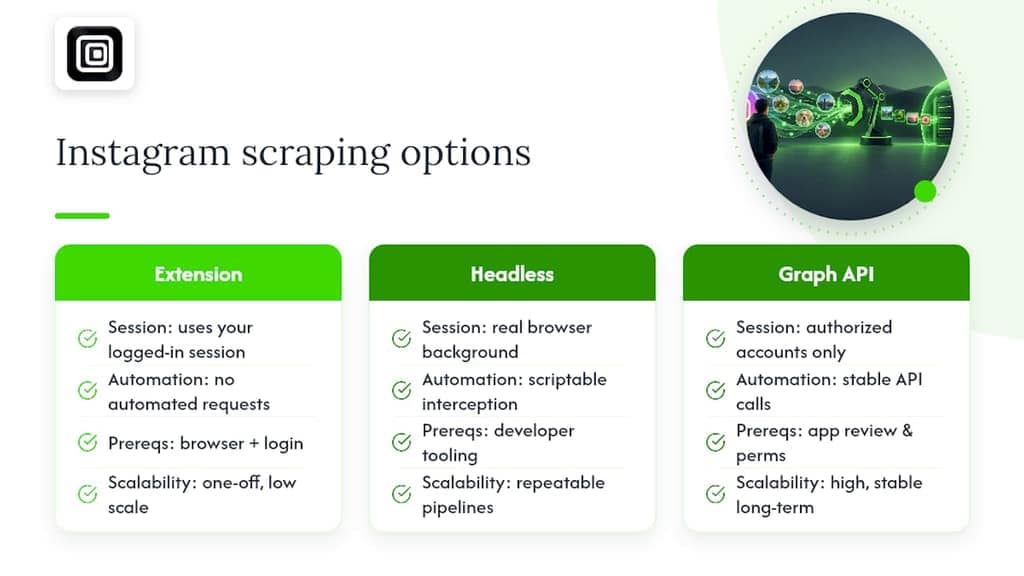
A browser extension runs inside your own logged-in session and reads the page exactly as you see it. Because it never automates clicks, never sends its own requests to Instagram's servers, and works entirely within your existing browser tab, it carries a lower block risk than tools that spin up their own traffic. This is the right default for one-off exports of visible data: follower lists, post archives, comment threads.
A headless browser with API interception, built with something like Playwright, opens a real browser window in the background and captures the network requests Instagram's own front end makes to load data. Open-source projects on GitHub show this pattern used to reconstruct post metadata, engagement counts, and media URLs from the same calls the app itself relies on. It is the better fit when you need a repeatable, scriptable pipeline rather than a manual export.
The official Graph API is the right choice only when you have a business or creator account with the API's required permissions and you are pulling your own account's data or data from accounts that have explicitly authorized your app. It is the most stable option long-term, but the prerequisites (app review, permissions, an approved use case) rule it out for most one-off research jobs.
Hosted scraper services run the collection job on someone else's servers, which scales well for large jobs but means your target list and results pass through a third party you do not control. That trade-off (scale against privacy) is worth weighing carefully before you send a client list to an external platform.
How to actually run a scrape, step by step
The right workflow depends on whether you want a quick export today or a pipeline you will run every week.
No-code, browser-extension workflow:
- Install the extension and sign in to Instagram as you normally would, in the same browser tab.
- Open the profile, hashtag page, or search result you want to capture.
- Choose the scope: a single profile, a list of profile URLs, or a hashtag/search query.
- Select which fields to export (profile data, posts, comments) and pick a file format.
- Download the CSV or JSON file and open it in a spreadsheet or your analytics tool.
Developer workflow with Playwright:
- Set up a Node.js environment and install Playwright.
- Write a script that opens Instagram in a headless browser and logs the network requests for the pages you care about.
- Add rate limiting between requests, ideally with randomized delays rather than a fixed interval.
- Parse the intercepted JSON responses into a consistent schema (post id, timestamp, caption, engagement counts).
- Write results to JSONL so each record can be appended incrementally as the job runs.
Discovery scraping (crawling a hashtag or search page to find profiles you did not already know about) is useful for market research but pulls in more noise and takes longer to filter. Direct-URL scraping (working from a list of profiles you already have) is faster and more predictable, and it is the better choice whenever you already know exactly whose data you need. A detailed developer-focused walkthrough of these programmatic methods is worth reading if you plan to build this yourself.
For recurring jobs, schedule incremental runs that only pull new posts or comments since the last export, rather than re-collecting everything each time. That keeps runtime down and reduces the request volume Instagram sees from your session.
Pro Tip: Start every new scraping project with a small direct-URL test run of five or ten profiles before you scale up. It catches schema issues and formatting quirks long before they become a mess in a 10,000-row file.
What a scraping project actually costs to run
Pricing for Instagram data collection tends to follow one of two shapes: a flat subscription with a monthly export quota, or a pay-per-result model where cost scales with the number of profiles or posts pulled. To estimate cost under either model, start with your target result count (say, 500 profiles) and check it against the plan's quota or per-result rate before committing to a tier.
Platform throttles are the other constraint that shapes cost. Instagram limits how many requests a single session or account can make in a given window, so a job that ignores those limits either fails partway through or risks the account being flagged. Building in delays costs you time, not money, but it is time you need to plan for.
A few ways to keep spend down:
- Sample first: pull a subset of your target list to validate the approach before running the full job.
- Collect incrementally: only capture new posts or followers since your last run instead of a full re-pull.
- Match the tool to the job size: a browser extension covers most one-off exports without any per-result billing at all.
- Avoid over-collecting fields: skip media downloads you do not need, since large media files add storage cost even when the tool itself is free.
Staying on the right side of platform rules and privacy law
There is a meaningful difference between data that is visible to any logged-in user (public profiles, public posts, public comments) and data that requires special access (private accounts, direct messages, anything behind a login wall you were not granted). Treat the first category as fair game for research and the second as off-limits without explicit permission.

Instagram's own terms of service govern automated collection on the platform, and it is worth reading them before running any large job. Beyond platform rules, the General Data Protection Regulation sets the standard that most privacy-conscious teams work toward even outside the EU: it requires a lawful basis for processing personal data, minimizing what you collect to what you actually need, and setting a retention period rather than keeping data indefinitely.
GDPR sets the compliance bar most teams now design around, even when their audience is global rather than EU-specific, because it is the most detailed framework of its kind currently in force.
Practical steps that reduce legal risk:
- Minimize personal data: collect handles and public metrics, not private contact details you do not need.
- Document your purpose: write down why you are collecting the data before you start, not after.
- Anonymize where possible: strip identifying fields from datasets used for aggregate research.
- Set a retention date: delete raw exports once you have extracted what you need.
If your project involves EU residents' personal data at any real scale, or you are unsure whether your use case qualifies as a legitimate interest under GDPR, that is the point to bring in a lawyer rather than guess. A dedicated look at the legal side of Instagram scraping covers platform terms and GDPR considerations in more depth.
How Instagram spots scrapers, and how to avoid tripping the alarms
Instagram's anti-bot systems watch for patterns a human browsing session would not produce: requests that come in faster than a person could click, headless browser flags in the request headers, and the same sequence of actions repeated over and over on different accounts. Any of these can get a session rate-limited or temporarily blocked.
The fixes are mostly about slowing down and looking less like a script:
- Use exponential back-off: when a request fails or slows down, wait longer before retrying rather than hammering the same endpoint.
- Randomize intervals: vary the delay between actions instead of using a fixed timer.
- Prefer single-session browser exports for smaller jobs: they generate traffic that looks identical to normal browsing because it is normal browsing.
- Watch for early warning signs: a sudden jump in failed requests or CAPTCHAs is the signal to pause, not push through.
Community repositories on GitHub that implement Playwright-based scraping typically bake in retry logic and rate limiting by default, because reliability depends on it as much as stealth does.
Pro Tip: If you notice your account getting logged out unexpectedly or hitting CAPTCHAs mid-run, stop the job for a few hours instead of retrying immediately. Pushing through usually extends the block rather than clearing it.
Getting your export into a spreadsheet or CRM without a mess
A clean schema saves more time downstream than any other part of the process. A useful baseline includes fields like id, handle, post_id, timestamp, caption, likes, comments_count, media_url, media_type, and hashtags, structured consistently across every record.
CSV works well for flat data (profile lists, post metrics) that a spreadsheet can read without modification. JSON or JSONL is the better format once you have nested data, like a post record that contains an array of comments, since forcing that into flat rows either duplicates the post data or loses the comment detail. Open-source scraper projects commonly output both formats side by side for exactly this reason, letting spreadsheet users and developers work from the same export.
A few integration habits worth building in from the start:
- Normalize timestamps: convert every date to a single time zone and format before analysis.
- Deduplicate on a stable id: post_id or comment_id, not the caption text, which can change.
- Name media files predictably: pair each downloaded image or video with its post_id so nothing gets orphaned.
- Keep raw and processed exports separate: it makes it easier to re-run analysis without re-scraping.
Mastros' privacy-first approach to Instagram exports
Mastros builds its extensions to run entirely inside the browser, which means an Instagram export never passes through a Mastros server, never requires an API key, and never touches a second login. The Instagram Follower Export & Scraper reads what your own signed-in session already displays and saves it to a file, the same principle behind the company's existing WhatsApp, Telegram, and LinkedIn extensions.
That architecture matters most to the people who use it:
- Growth and lead-gen teams pulling follower and engagement data without sending client-adjacent lists to a third-party platform.
- Researchers and community managers who need a defensible, low-exposure way to archive public account data.
- Agencies auditing influencer accounts who want original-quality media alongside follower and comment exports.
Where hosted scraping services run your job on infrastructure you do not control, Mastros keeps the entire process on your own machine, in your own browser tab, under your own account.
How long an Instagram scraping project actually takes
A small, one-off export (a single profile's posts and followers) with a browser extension typically takes minutes: install, sign in, choose scope, and download. That is the fast path for a market research spot-check or a single influencer audit.
A developer pipeline built on Playwright is a different timeline entirely. Setting up the environment, writing the interception logic, and testing against a handful of profiles usually takes a few working sessions before the first clean export comes out. From there, scaling to a full target list depends heavily on how aggressive your rate limiting needs to be. Slower, safer pacing (longer randomized delays) stretches a 1,000-profile job over hours or days rather than minutes, and that is by design, not a flaw in the setup.
Ongoing, scheduled collection (a weekly hashtag tracker, for instance) has a different shape again: the setup cost is front-loaded, and each subsequent run is fast once the schema and rate limits are dialed in. Budget for the first run to include: several iterations to catch schema issues, one or two rounds of rate-limit tuning after early blocks or CAPTCHAs, and only then a stable, repeatable cadence.
The Graph API route has the longest lead time, since app review and permission approval can take days to weeks before your first pull even runs, but once approved it tends to need the least ongoing maintenance.
What an Instagram scraping project really costs, beyond the tool itself
The advertised price of a scraper tool or subscription is rarely the whole story. A browser extension with a flat monthly quota keeps costs predictable, but a headless browser pipeline carries costs that do not show up on any pricing page: server time to run the script, proxy rotation if you are collecting at meaningful scale, and storage for any media you download alongside the metadata.
Proxies in particular add up fast on larger jobs, since spreading requests across multiple IP addresses is one of the main ways developer-built scrapers avoid rate limits, and that infrastructure is billed separately from whatever scraper code you are running. Server costs follow the same pattern: a script that runs for a few minutes on your own laptop is free, but a job that needs to run continuously for days lands on a cloud bill.
Hosted scraper services fold some of this into their subscription price, which is part of their appeal, but that convenience is also where the privacy trade-off from earlier shows up again: you are paying someone else to run infrastructure on data you handed them.
A browser extension sidesteps most of this category of cost entirely, since there is no server to rent and no proxy pool to manage. The trade-off is scale: it is built for exports you can run from your own session, not for continuous collection across thousands of accounts at once.
What I'd actually try first
If you need a dataset once, start with a browser export. It is faster to set up than any script, and it avoids the privacy trade-offs that come with handing a target list to a hosted service. If you need the same job to run every week, or you are building something on top of the data, a Playwright pipeline is worth the setup time because it is reproducible and you control every part of it.
The real trade-off is privacy against scale, not quality against cost. A one-off research project rarely needs the infrastructure a growth team running weekly reports actually does.
— Elias Mahdavi
Try a browser export before you build anything heavier
If you have read this far and mainly want follower, comment, and post data without setting up Playwright or handing a target list to a hosted service, the Instagram Follower Export & Scraper is built for exactly that. It runs in your browser, reads what your own session already shows, and exports to CSV, JSON, or JSONL, the same formats a spreadsheet or analytics tool already expects.
Mastros offers a Free plan to test the workflow, a Pro plan at $9 per month, and a Scale plan at $18 per month for larger export volumes, all listed on the main plans page. Privacy-sensitive researchers and growth teams who need visible-data exports without a hosted third party in the loop are the best fit to start here. Check availability on the Instagram scraper landing page and see which plan matches your export volume.
Sources
- GitHub - AlbertoQuian/instagram-tiktok-scraper at b863d5a46e299d966c41d475821fa4d4f1c9a04d · GitHub
- Node.js
- General Data Protection Regulation — Wikipedia
FAQ
Is Instagram scraping illegal?
Scraping publicly visible data is generally treated differently from accessing private or password-protected content, but Instagram's own terms of service place restrictions on automated collection. Whether a specific project is compliant depends on what data you collect, how you use it, and which region's laws apply, so check the platform's terms and consider legal advice for larger projects.
Is it possible to scrape Instagram?
Yes, public profile data, posts, hashtags, and comments can be collected using a browser extension, a headless browser with API interception, or the official Graph API for accounts you have permission to access. Each method has different trade-offs in speed, privacy exposure, and setup complexity.
Is AI scraping illegal?
There is no single legal category called "AI scraping": whether an automated collection method is permitted depends on the same factors as any scraping method, including the platform's terms of service, the type of data collected, and applicable privacy law like GDPR. The tool used to build the scraper does not change those underlying rules.
What does "Instagram scraping" mean?
Instagram scraping means collecting data that is visible on the platform, such as profile fields, posts, comments, and hashtag results, and saving it into a structured file like a CSV or JSON export. It ranges from a browser extension reading your own signed-in session to a developer-built script that intercepts network requests.
How do I choose between a browser extension and a developer pipeline?
A browser extension is the faster, lower-setup option for one-off exports of visible data, since it works directly inside your existing signed-in session. A developer pipeline built with Playwright makes more sense when you need scheduled, repeatable collection at a larger scale, since it gives you full control over rate limiting and data structure.