



Client-side scraping means pulling data directly from a page's rendered DOM inside the browser, using the same session a person is already logged into. It's the right call when you need content that only appears after JavaScript runs, or when the data sits behind a login you already have open. Use it for ad-hoc exports and authenticated pulls; reach for server-side crawling instead when you need scheduled runs at scale.
TL;DR:
- Client-side scraping is ideal for extracting dynamically generated or login-protected content within your current browser session, especially for small-scale or ad-hoc tasks.
- Using page DOM evaluation or network intercepts to capture JSON responses is the most effective method for stable, structured data extraction from modern single-page applications.
- Transitioning from console scripts to browser extensions or headless browsers is necessary when automation, scheduling, or handling many pages becomes a priority.
- Cross-origin restrictions are bypassed by extensions or CORS proxies, but only legitimate session data can be accessed, preventing circumvention of security boundaries.
- Building resilience through layered selectors, waits, retries, and progress storage prevents scraper breakage due to frequent website updates or structural changes.
Table of Contents
- What Is Client-Side Scraping, and When Does It Fit?
- What Techniques Work for Extracting Rendered Content?
- Which Tools Turn a Prototype Into a Repeatable Export?
- Why Do Some Client-Side Requests Get Blocked?
- How Do You Keep a Client-Side Scraper From Breaking?
- How Mastros Applies These Principles in Practice
- What's a Practical Workflow for Extracting Rendered Data?
- Which Trade-Offs Matter Here?
- Try Mastros for Repeatable Browser-Only Exports
- Sources
- FAQ
What Is Client-Side Scraping, and When Does It Fit?
Server-side rendering (SSR) sends a browser a complete HTML document. The server does the work before the page ever reaches you, so a simple HTTP request and an HTML parser can grab everything you need. Client-side rendering (CSR) is different: the server sends a nearly empty HTML shell, and JavaScript builds the actual content in the browser after the page loads. Single-page apps built with React, Vue, or Angular almost always work this way, which means a plain fetch() of the page's HTML returns a skeleton, not the data.
That gap is exactly why client-side scraping exists. If the content only materializes after JavaScript executes, you either run a headless browser server-side to render it, or you extract it from within a real browser that already ran the script. The second option has real advantages:
- You inherit whatever authenticated session is already open, so there's no need to reverse-engineer login flows or manage auth tokens.
- Prototyping is fast. You can test a selector in DevTools and have working extraction logic in minutes.
- You see exactly what the page shows a real user, including content gated behind cookies or session state.
The trade-offs are just as real; for more on managing how crawlers impact your site, see Taming the Bots Balancing AI Crawlers With Website Performance and Accuracy. Client-side approaches don't scale well to thousands of pages, they're harder to schedule unattended, and they expose you more directly to anti-bot detection since you're operating inside the same browser context a site expects a human to use. For a one-off export or a browser-authenticated pull, that's a fair price. For a nightly crawl of ten thousand product pages, it isn't.
What Techniques Work for Extracting Rendered Content?
Once you've decided the browser is the right place to work, the question becomes which technique fits the page in front of you. Here's a rough order of preference, from simplest to most involved:
- DOM evaluation. Start with
document.querySelectororquerySelectorAll, then pullinnerText,datasetattributes, or specific HTML attributes off the matched elements. This is the fastest path and works for the majority of pages once content has rendered. - Network interception. Open the Network tab and filter by XHR or Fetch. Most CSR sites populate their DOM from a JSON API, and reading that response directly is more stable than parsing HTML, since the shape of a JSON payload changes far less often than CSS classes do.
- MutationObserver and IntersectionObserver. For infinite-scroll feeds or lazy-loaded sections, register a
MutationObserverto fire when new nodes appear, or anIntersectionObserverto detect when an element enters the viewport and trigger the next load. - Shadow DOM and embedded JSON. Some frameworks render inside a shadow root, which standard selectors can't pierce without
shadowRoot.querySelector. Others embed a full data blob in a<script type="application/json">tag, which is often the cleanest source of all, since it's the exact object the framework used to build the page. - Bookmarklets and console helpers. For a quick, one-off job, a bookmarklet or a snippet pasted into the console can inject helper functions straight into the page. artoo.js is a good reference implementation of this pattern: it injects jQuery and utility functions into the page context and can spider AJAX-driven sites, then export whatever it scraped directly from the browser.
Extensions become worth building once you need repeatable exports, or when the job requires permissioned access to cookies and local session data that a bare script running in the page can't reach on its own.
Pro Tip: Check the Network tab before writing a single selector. If the page fetches structured JSON to render itself, reading that response directly will survive a redesign that would break every CSS selector you wrote.
Which Tools Turn a Prototype Into a Repeatable Export?
A bookmarklet or console snippet is the right starting point for almost any client-side job, but it isn't the endpoint for every job. The path usually runs through three stages, each suited to a different volume and repeat frequency:
- Bookmarklet or console script: fastest to write, zero install, but you re-run it manually every time and it disappears when you close the tab.
- Browser extension: persists across sessions, can request permissions for storage and downloads, and gives you a real UI for configuring what to export. This is where a one-off script graduates into a tool a whole team can use.
- Headless-browser bridge: tools like Playwright or Puppeteer drive a real (or headless) browser from a local script, letting you automate navigation, clicks, and scrolling from outside the page. This is the move when you need scheduling or parallel runs across many accounts, and it starts to blur into server-side territory even though it's still rendering pages in a browser engine.
Cross-origin needs complicate all three. If the data you want lives on a different domain than the page you're scripting, a plain fetch() will usually fail. Extensions get around this by requesting host permissions; standalone scripts sometimes route through a CORS proxy or load the target inside an iframe. Small utility projects like Getsy build exactly this kind of workaround into their API, offering an iframe mode and a configurable CORS proxy option for pages that won't cooperate directly. None of these patterns are exotic. They're the same handful of moves developers reach for again and again, just assembled differently depending on whether the job runs once or runs every night.
Why Do Some Client-Side Requests Get Blocked?
Browsers enforce a security boundary called the same-origin policy, and it's the reason a script running on one domain can't freely read responses from another. A page loaded from example.com cannot call fetch('https://api.other-site.com/data') and read the result unless that other server explicitly opts in via CORS headers.
Content Security Policy adds a second layer. A site can set a CSP header that blocks inline scripts, restricts which domains can serve executable code, or prevents dynamic script injection entirely, which is exactly the technique bookmarklets rely on. That's part of why bookmarklets work reliably on some sites and fail silently on others.
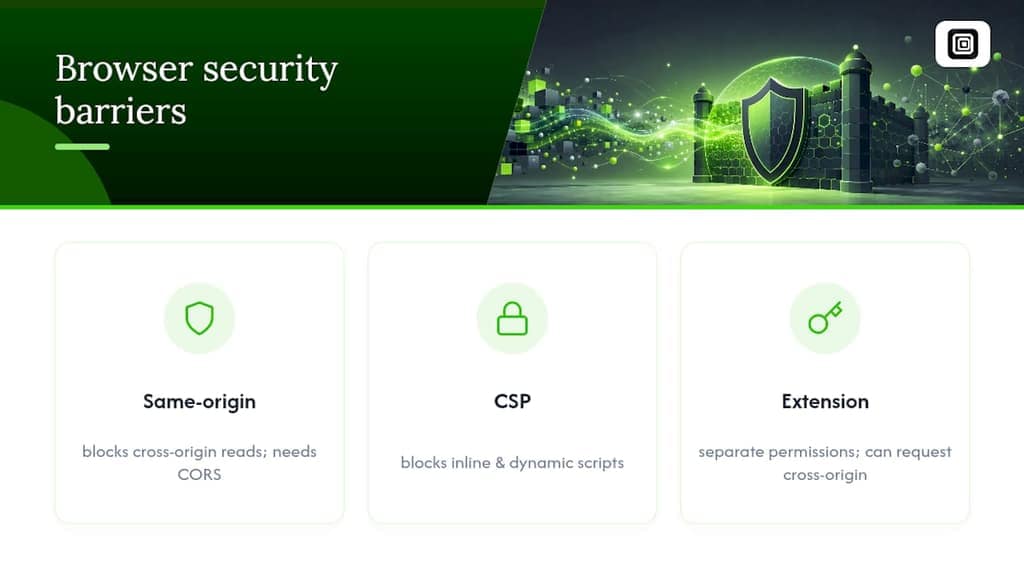
Browser extensions largely sidestep both restrictions. An extension's content script runs in the page's context but under a separate permission model granted by the browser, not the page's own CSP, and a background script can request cross-origin access explicitly through the extension's manifest. That's a meaningfully different security posture than a bookmarklet trying to inject itself into a page that doesn't want it there.
None of this is a workaround for accessing content you shouldn't. The same boundaries that block a naive cross-origin fetch exist for good reason, and the practical rule holds regardless of technique: only extract data you can already legitimately view in your own session, and never route around a login wall to reach content that isn't yours to see.
How Do You Keep a Client-Side Scraper From Breaking?
Dynamic pages change shape constantly, and a scraper built on a single brittle selector breaks the first time a class name shifts. Building in resilience from the start saves you from rewriting the same script every week.
- Layer your selectors. Don't rely on one CSS class. Fall back to
data-*attributes, ARIA roles, or nearby anchor text if the primary selector comes up empty. - Wait deliberately.
DOMContentLoadedfires too early for CSR pages. A MutationObserver that watches for your target node is more reliable than a fixedsetTimeout, which either fires too soon or wastes time waiting. - Scroll with retries. For infinite feeds, scroll in controlled increments, check whether new content actually loaded, and back off if a scroll produces nothing new after a few attempts.
- Persist progress. Save scraped IDs to
localStorageorIndexedDBas you go, so an interrupted run can resume instead of starting over. - Validate before export. Dedupe on a stable key (an ID or URL, not display text that can repeat) and check for empty fields before writing the final CSV or JSON file.
Pro Tip: Store a "last scraped ID" checkpoint in IndexedDB rather than a simple counter. Feeds reorder and insert new items constantly, and a position based on an ID survives that; a position based on scroll offset doesn't.
How Mastros Applies These Principles in Practice
Mastros was built around the idea that browser-first extraction should never mean shipping someone's private messages to a third-party server. Its Telegram, WhatsApp, and LinkedIn extensions run the exact DOM-reading and network-interception techniques covered above, but packaged so a non-developer can trigger them from a button.
A few specifics worth knowing:
- Every export happens inside your own signed-in session. Nothing uploads to a Mastros server, and no API key or second login is required.
- The Telegram extension pulls group members, messages, and bulk media directly from the rendered chat view.
- The WhatsApp extension reads the same DOM you already see in WhatsApp Web, including contacts and media, without touching the WhatsApp Business API.
- The LinkedIn extension exports profile, company, and Sales Navigator lead data as structured files, without guessing at email addresses.
For a longer walkthrough of the underlying approach, Mastros' guide to browser-based data extraction covers the same DOM-first thinking in more depth.
What's a Practical Workflow for Extracting Rendered Data?
- Open DevTools and confirm the target content actually exists in the rendered DOM, not just in a loading state.
- Check the Network tab for an XHR or Fetch call returning structured JSON. If one exists, read that instead of parsing HTML.
- Prototype in the console or a bookmarklet, then export a first sample as CSV or JSON to confirm the shape is right.
- Add retry logic, explicit waits, and local storage for resumability once you trust the extraction logic.
- If you'll repeat the job regularly, move it into an extension or a headless-browser bridge instead of rerunning a console script by hand.
Which Trade-Offs Matter Here?
Browser-first extraction earns its keep whenever authentication is the hard part. Skipping token management and running inside a session you already trust saves real time, especially on platforms that rotate their login flow often. Once a job needs scheduling, parallel accounts, or thousands of pages a day, though, the same browser-context constraints that made prototyping fast start working against you, and server-side infrastructure becomes the more honest answer. Whichever route you take, extract only what your own session can already see, and never automate messages or contact requests to get there.
— Elias Mahdavi
Try Mastros for Repeatable Browser-Only Exports
Bookmarklets and console scripts are great for a one-off pull, but rerunning them by hand every week gets old fast. Mastros packages the same browser-first techniques into extensions built for exactly that repeat case: Telegram group and media exports, WhatsApp chat and contact backups, and LinkedIn or Sales Navigator lead lists, all pulled straight from your own signed-in session with nothing routed through an external server. There's no API key to manage and no second login, which matters most once you're exporting media-heavy chats or bulk lead lists on a regular cadence. If you're already comfortable writing your own DOM selectors but tired of maintaining them, check the LinkedIn and Sales Navigator exporter or start with the free plan at Mastros to see how far a browser-only export takes you before you need to build anything custom.
Sources
- Web scraping — Wikipedia
- Same-origin policy — MDN Web Docs
- A systematic review of web scraping: Techniques, LLM-enhanced approaches, performance metrics, and legal–ethical issues
- artoo.js documentation
FAQ
Is Web Scraping Illegal in the US?
Scraping publicly available data is generally not illegal in the US, but accessing content behind a login without authorization, circumventing security measures, or overwhelming a server with requests can create legal exposure. The safer rule for client-side work is to extract only what your own authenticated session already shows you.
What Does Scraping Mean in a Business Context?
In a business setting, scraping usually refers to pulling structured data (leads, listings, prices, engagement numbers) out of a website or app for use in a CRM, spreadsheet, or analytics tool. Tools like Mastros apply this to exporting LinkedIn leads or Telegram group data directly from the browser into a CSV or JSON file.
Can ChatGPT Do Web Scraping?
Not on its own. Large language models are analysis layers that can parse and summarize content once it's retrieved, but they require a separate browsing or fetch agent to actually load pages and pull data from them.
What Is an Example of Client-Side Scraping?
A common example is running a script in your browser console that reads message text and timestamps directly from a chat app's rendered DOM, then downloads the result as a CSV. Mastros' WhatsApp export workflow is a packaged version of exactly that pattern.