



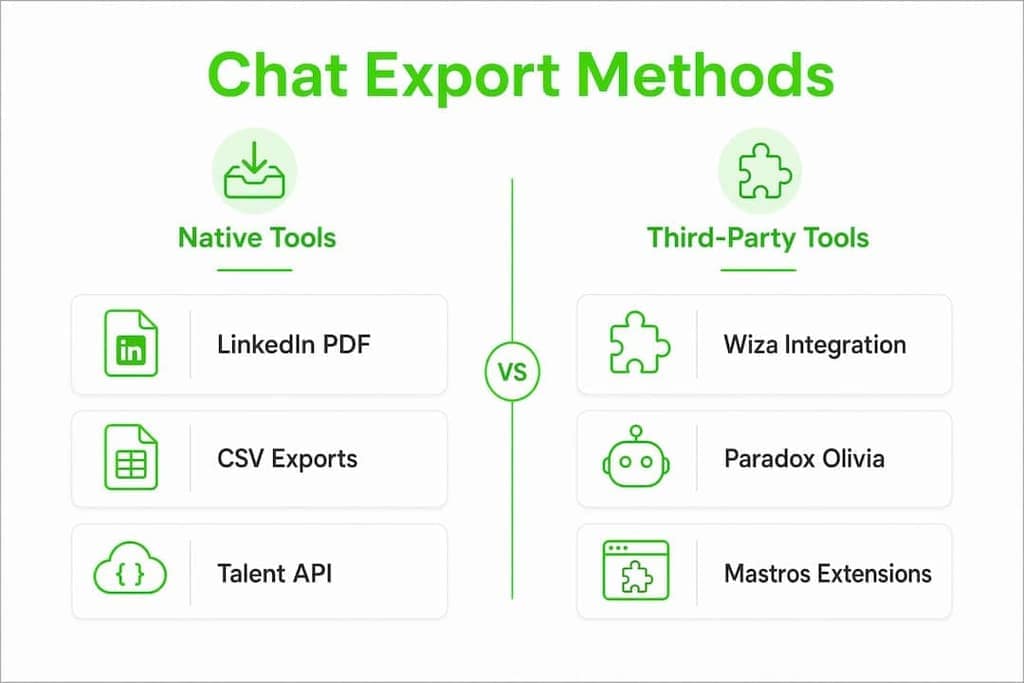
The fastest recruiters aren't spending time manually copying candidate messages into spreadsheets. They're using a chat exporter for recruiters, whether that's LinkedIn Recruiter's built-in PDF and CSV exports, a third-party tool like Wiza, or a privacy-first browser extension that keeps every byte of data on their own device. Here's a quick map of what's available:
- LinkedIn Recruiter native exports: PDF for individual profiles, CSV for candidate lists and project pipelines
- Third-party tools (Wiza): Enhanced CSV lead extraction from LinkedIn Recruiter projects with pipeline support
- Conversational AI agents (Paradox Olivia, Eightfold Candidate Agent): Automated chat syncing directly into your ATS, reducing manual export needs entirely
- Privacy-first browser extensions (Mastros): Local export of Telegram and WhatsApp group messages, contacts, and media to CSV, JSON, or JSONL, with no cloud upload
- Common export formats across all methods: CSV, JSON, JSONL, and PDF
Each approach fits a different workflow. The right one depends on which platforms your candidates actually use and how much control you need over the raw data.
How to use LinkedIn Recruiter's built-in export features
LinkedIn Recruiter's native exports give you two formats: PDF for individual candidate profiles and CSV for candidate lists pulled from projects, pipelines, or search results. Both are accessible directly inside the platform without any third-party software.
Exporting individual profiles as PDFs
Open any candidate profile in LinkedIn Recruiter, click the "More" menu, and select "Save to PDF." The downloaded file includes the candidate's name, headline, current role, education, and contact details if shared. It's clean and shareable, but it's a snapshot, not a data feed. You can't batch-export PDFs for an entire project at once.

Exporting candidate lists as CSVs
For bulk exports, go to your project or pipeline view, select the candidates you want, and use the "Export" option to download a CSV. The file includes fields like name, current title, company, location, and any notes or tags you've added in Recruiter. This is the format most recruiters push into their ATS or a spreadsheet for tracking.
Key limitations to plan around:
- LinkedIn throttles export volume. If you're pulling large batches, you may hit rate limits that delay your export queue.
- CSV exports from LinkedIn Recruiter do not include full message histories. You get profile data, not conversation logs.
- Data completeness varies: fields a candidate hasn't filled in on their profile simply won't appear in the export.
- Exports from search results are capped, so very large result sets may require multiple batched pulls.
Pro Tip: Name your exported CSV files with the project name and date (e.g., "SoftwareEng_Pipeline_June2026.csv") before importing to your ATS. It takes five seconds and saves real confusion when you're reconciling records three months later.
Organizing your exports matters as much as running them. Keep a dedicated folder per role, archive completed project exports after hire, and always deduplicate before importing into your ATS to avoid creating ghost candidate records.
How does LinkedIn's Talent API work for candidate data retrieval?
For teams that need automated, repeatable exports rather than manual one-off downloads, LinkedIn's Talent API is the deeper option. It lets you retrieve candidate data programmatically, which is useful for syncing LinkedIn Recruiter data into a custom ATS or analytics platform.
Here's how the process typically works:
- Authentication: Your application authenticates via OAuth 2.0. LinkedIn issues an access token scoped to the permissions your integration has been granted through the Recruiter System Connect (RSC) program.
- Endpoint selection: The primary endpoint for exported candidates is the Retrieve Exported Candidates endpoint, which returns candidate records in JSON format.
- Pagination and throttling: LinkedIn enforces rate limits on API calls. You must batch requests and schedule them to stay within quota. Hitting the limit returns a 429 error, and retrying too quickly compounds the delay.
- Response format: API responses come back as JSON objects. A typical candidate record includes fields for profile URN, name, headline, and export metadata. Here's a simplified example of what a response object looks like:
{
  "elements": [
    {
      "candidate": {
        "profileUrn": "urn:li:fs_profile:ACoAAA...",
        "firstName": "Jordan",
        "lastName": "Rivera",
        "headline": "Senior Product Designer"
      },
      "exportedAt": 1718000000000
    }
  ],
  "paging": {
    "count": 25,
    "start": 0,
    "total": 142
  }
}
- Processing the data: Once you have the JSON, you can flatten it into a CSV, push it directly into your ATS via webhook, or store it in a database for reporting. Most teams write a lightweight script in Python or Node.js to handle the transformation.
- Key difference from manual exports: The API captures richer metadata, including timestamps and export event data, that the manual CSV download omits. DOM-based scraping tools, by contrast, only grab what's rendered on screen and miss data buried in paginated or collapsed sections.
The API route requires developer resources and LinkedIn partnership approval through RSC. It's not a weekend project, but for high-volume teams running hundreds of exports a month, the automation payoff is real.
What third-party tools let you export candidate chat and messaging history?
Manual LinkedIn exports don't touch message histories. That gap is where third-party recruitment chat tools and browser extensions come in. Most platforms don't offer on-demand single-conversation export natively, so browser extensions fill that gap with selective, immediate exports that fit recruiter workflows.
The table below covers the main options recruiters use in 2026.
| Tool | Integration with LinkedIn | Export formats | Automation level | Best for |
|---|---|---|---|---|
| LinkedIn Recruiter (native) | Native | PDF, CSV | Manual | Integrated profile and pipeline exports |
| Wiza | Direct LinkedIn integration | CSV | Semi-automated | Bulk lead extraction from LinkedIn projects |
| Paradox Olivia | ATS sync | ATS-native | Fully automated | Automated candidate screening with ATS sync |
| Eightfold Candidate Agent | ATS sync | ATS-native | Fully automated | Multilingual multi-channel candidate engagement |
| Mastros (Telegram/WhatsApp) | None (separate platforms) | CSV, JSON, JSONL | Semi-automated | Privacy-first export of Telegram and WhatsApp chats |
Wiza sits closest to LinkedIn Recruiter in the workflow. It connects directly to your LinkedIn Recruiter account and lets you export leads from projects and search results into enriched CSVs with contact data that LinkedIn's native export often omits. For recruiters who live in LinkedIn and need cleaner pipeline exports, it's a practical upgrade over the native tool.
Paradox Olivia takes a different angle entirely. Rather than exporting chat histories after the fact, Olivia handles candidate screening and interview scheduling inside a chat interface, then syncs conversation summaries directly into your ATS. The result is that you rarely need to export anything manually because the data lands in the right place automatically.

Eightfold Candidate Agent goes further on reach. It engages candidates across SMS, WhatsApp, web, and voice in 24+ languages, drawing on a matching model grounded in more than 1.6 billion career trajectories. Applications and conversation data flow directly into your ATS and the Eightfold platform, with candidates handed off into the interview pipeline without recruiter intervention. For high-volume or multilingual hiring, that continuous thread from first message to applied is the key differentiator.
Exported chat histories serve a practical audit function beyond just data storage. Recruiters use them to verify offer details, confirm what was communicated about compensation or start dates, and resolve disputes before they become costly. That use case alone justifies keeping structured message logs, even when your ATS captures the summary.
Integrating chat export tools with your ATS via webhook or direct profile mapping cuts hours of manual data entry per week. If a tool you're evaluating doesn't offer ATS push or at minimum a clean CSV that maps to your ATS fields, factor that friction into your decision.
How Mastros handles privacy-first chat exports for recruiters
Mastros builds two Chrome extensions that solve a specific problem: exporting Telegram and WhatsApp conversation data without sending any of it to a third-party server. Everything runs locally in your browser. The candidate data never leaves your device.
That architecture matters for compliance. When you're handling candidate communications under GDPR or CCPA, uploading chat logs to a cloud-based export service creates a data transfer you may not be authorized to make. Local processing in browser-based exporters keeps that risk off the table entirely.
Here's what each extension exports:
- Telegram extension: Group members, chat messages, recent contacts, mutual groups, and bulk media from Telegram Web. Profiles come back with timestamps and metadata, and there are no API credentials to set up.
- WhatsApp extension: Group members, chat messages, and recent contacts from WhatsApp Web in read-only mode. No API, no automation, no outbound messaging.
- Output formats for both: CSV, JSON, and JSONL, ready to import into your ATS, a spreadsheet, or a data pipeline.
For recruiters sourcing candidates through Telegram communities or coordinating with candidates over WhatsApp, these extensions fill a gap that LinkedIn-focused tools don't touch. You pull the participant list from a relevant Telegram group, export it to CSV, and you have a structured contact list in minutes.
One thing is worth understanding if you're handling volume. The extension does not read the text painted on screen. It reads Telegram's own structured data through the session you are already signed into, which is why it returns handles, bios and metadata the rendered interface never displays. The distinction between reading structured data and scraping the DOM is real, and it is the reason no API credentials are needed to get complete profiles.
Pro Tip: Before exporting any candidate chat data, check your company's data retention policy and confirm the export is covered by your existing privacy notices. A quick review now prevents a compliance headache later. For a detailed walkthrough on staying within GDPR boundaries, the GDPR-compliant chat export guide on the Mastros blog is a practical starting point.
Integrating Mastros exports into an ATS workflow is straightforward. Export to CSV, map the column headers to your ATS import template, and run the import. For teams using JSON or JSONL, a lightweight script can push records directly via your ATS's API. The Telegram API vs. browser extension comparison on the Mastros blog covers the technical tradeoffs in more detail if you're deciding which mode fits your setup.
Mastros is a different kind of tool for a different part of the workflow
The tools compared above, LinkedIn Recruiter, Wiza, Paradox Olivia, and Eightfold Candidate Agent, all operate within the LinkedIn and ATS ecosystem. Mastros operates where those tools don't: Telegram and WhatsApp, the messaging channels where a growing share of candidate conversations actually happen.
If your sourcing already extends into Telegram communities or WhatsApp groups, Mastros gives you a way to export that data cleanly, locally, and without a cloud intermediary. No subscription to an enterprise platform. No data leaving your device. The Mastros extensions run in Chrome, export to CSV, JSON, or JSONL, and work with Telegram Web and WhatsApp Web directly. For recruiters who need to pull group member lists, export conversation histories, or build contact databases from messaging platforms, it's a practical tool that fits alongside whatever ATS or LinkedIn workflow you already have. You can also explore the Telegram Scraper extension specifically if Telegram is your primary sourcing channel.
Key Takeaways
The most effective approach to exporting candidate chat data combines LinkedIn's native tools for profile pipelines, a third-party enhancer like Wiza for bulk leads, AI agents for automated ATS syncing, and a privacy-first extension for messaging platforms outside LinkedIn.
| Point | Details |
|---|---|
| LinkedIn native exports cover profiles, not messages | PDF and CSV exports give you profile and pipeline data but do not include conversation histories. |
| API access unlocks automation but requires setup | LinkedIn's Talent API returns JSON with richer metadata, but needs OAuth, RSC approval, and developer resources. |
| AI agents reduce manual export needs | Paradox Olivia and Eightfold Candidate Agent sync chat data directly to your ATS, cutting manual export steps. |
| Privacy-first local processing protects candidate data | Browser extensions that run entirely on your device avoid unauthorized data transfers under GDPR and CCPA. |
| Mastros fills the Telegram and WhatsApp gap | Mastros exports group members, messages, and contacts from Telegram and WhatsApp locally to CSV, JSON, or JSONL. |