



Normalize phone numbers to E.164 and store the extension separately. That is the canonical format: a leading "+", the country code, and the subscriber number, with nothing else mixed in. Use Google's libphonenumber when you can, or build a sanitize, map, parse, and format pipeline when you can't. Keep the raw input too, for audit trails.
TL;DR:
- Google's libphonenumber ensures consistent normalization and validation, but country-specific trunk prefix rules, like Italy's, require custom handling.
- Storing the raw input alongside the normalized E.164 number and extension is crucial for future reprocessing and audit trails.
- Always verify that normalized numbers comply with the 15-digit maximum and match country-specific subscriber number patterns.
- Use a staged pipeline for normalization, including sanitization, numeral conversion, vanity mapping, country detection, parsing, and length validation.
- Regularly update country numbering metadata and flag ambiguous or unverifiable numbers for manual review to maintain accuracy.
Table of Contents
- What Is E.164 and What Are the Core Rules?
- Why Normalization Matters for Databases and CRMs
- How Do You Normalize a Phone Number Step by Step?
- What Edge Cases Break Naive Normalization?
- Which Libraries and Tools Handle This Well?
- How Should You Store Normalized Numbers in a Database?
- How Do You Test and Monitor a Normalization Pipeline?
- What Should a Launch Checklist Look Like?
- What Matters When You Choose an Approach
- Where Does the Contact Data Come From in the First Place?
- Where to Verify These Standards Yourself
- Sources
- FAQ
What Is E.164 and What Are the Core Rules?
E.164 caps a valid number at 15 digits total, not counting the leading "+". Inside that limit, the country code takes 1 to 3 digits, and everything after belongs to the national destination code and subscriber number. This isn't arbitrary. The ITU-T standard defines it that way so international switching equipment can route calls without guessing where one segment ends and another begins.
The structure breaks into three pieces developers need to treat separately, not as one long string:
- Country code (CC): 1 digit for the North American Numbering Plan (+1), 2 or 3 digits for most other countries (+44 for the UK, +376 for Andorra).
- National destination code (NDC): often called an area code informally, though the two aren't always identical.
- Subscriber number: the remaining digits, length varies by country and sometimes by carrier.
The NANP is worth knowing by name because it quietly covers the US, Canada, and over a dozen Caribbean nations under one shared +1 code, each with its own 3-digit area code, as Wikipedia's E.164 breakdown lays out. That single fact explains why "+1" alone tells you almost nothing about where a number actually rings.
Trunk prefixes complicate things further. Many countries use a leading 0 for domestic dialing that must be dropped when converting to E.164, but not all of them. Italy is the classic exception: mobile and some landline numbers keep the leading 0 even in full international format. Hard coding "always strip the leading zero" will quietly corrupt Italian records.
Why Normalization Matters for Databases and CRMs
Unnormalized phone data breaks three things: deduplication, delivery, and analytics. A CRM that stores "(555) 123-4567", "555.123.4567", and "+15551234567" as three different values will create three different contact records for one person. Sales and support teams end up working the same lead twice, or worse, missing a support history because the system never recognized the match.
Delivery and lookup services depend on clean formatting too. SMS gateways, carrier lookups, and click-to-call features generally expect strict E.164 input, and malformed numbers get silently rejected or routed to the wrong carrier.
Consider what breaks downstream when normalization is skipped:
- Duplicate contact records inflate CRM counts and skew pipeline reporting.
- SMS or voice APIs reject or misroute improperly formatted numbers.
- Country-level analytics undercount users because "0044" and "+44" numbers get bucketed separately.
- Privacy audits get harder when the same person's number exists in multiple inconsistent formats across systems.
Pro Tip: Run a one-time audit query grouping numbers by digit count before you build anything. If your dataset spans a dozen formats, you'll want the full pipeline described below, not a quick regex.
How Do You Normalize a Phone Number Step by Step?
Treat normalization as a pipeline, not a single regex. Each stage handles one failure mode, and skipping a stage is usually where production bugs come from.
- Sanitize while preserving structure. Strip spaces, dashes, parentheses, and dots, but keep the leading "+" if present and isolate any extension marker ("x", "ext.", or a trailing comma sequence) before you touch the rest of the string.
- Normalize numerals. Convert wide-ASCII digits (full-width Unicode forms common in East Asian input methods) and Arabic-Indic numerals to standard European digits before parsing. Skipping this step is a common source of parse failures in multilingual datasets, according to the normalization logic in python-phonenumbers.
- Convert vanity letters if warranted. Map alphabetic characters to digits per the E.161 keypad standard, but only when the input has three or more consecutive letters. That threshold, used in python-phonenumbers, avoids mangling a number that happens to contain a single stray letter from a copy-paste error.
- Detect country context. If the input starts with "+", trust the explicit country code. If it doesn't, fall back to a default region based on the user's account locale, sign-up IP, or form field, and flag anything ambiguous for review.
- Parse using metadata, not guesswork. Feed the sanitized string and detected region into a metadata-driven parser rather than hand-rolled length checks per country.
- Format to E.164 and split the extension. Store the core number as "+" plus digits, and put any extension in its own field.
- Validate length and range. Confirm the result respects the 15-digit ceiling and that the subscriber number length matches what the country's numbering plan allows.
Pro Tip: Never discard the original input string. When a parse fails or a country's numbering plan changes retroactively, the raw value is the only way to re-run normalization later without contacting the customer again.
What Edge Cases Break Naive Normalization?
Vanity numbers cause the most confusion. "1800FLOWERS" needs letter-to-digit mapping, but a number like "555-CALL-BOB" with mixed segments needs the same three-or-more-letter heuristic applied per cluster, not to the whole string at once.
Extensions are their own trap. A number like "+1 555 123 4567 x204" should never have "204" appended to the E.164 value; store it in a dedicated extension field, because appending it corrupts the 15-digit limit and breaks any lookup against that number.
Trunk prefixes vary by country in ways that resist generalization. Most countries expect you to drop the leading 0 when converting to international format, but Italy is a documented exception where the leading 0 stays even in the +39 form. A lookup table of country-specific trunk behavior, sourced from a maintained country calling code reference, beats a single global rule every time.
Other failure points worth building tests for:
- Unicode digits from non-Latin keyboards that never get converted before parsing.
- Numbers entered without any country context, where the parser has to guess a default region.
- Inputs that are technically the right length but fail a country's actual subscriber-number pattern.
- Numbers too short to be real (accidental partial paste) or too long (concatenated extension with no separator).
Pro Tip: When country detection is ambiguous, don't silently default to your company's home country. Flag the record for manual review instead. A wrong silent guess is worse than an honest "unresolved" status.
Which Libraries and Tools Handle This Well?
Google's libphonenumber is the closest thing this space has to a standard implementation. It parses freeform input, validates it against per-country metadata, formats to E.164 or national display format, and ships an AsYouTypeFormatter for live input fields. Canonical ports exist for Java, JavaScript, and Python (python-phonenumbers), so you rarely need to write parsing logic from scratch in a mainstream language.
The library exposes two validation tiers worth knowing apart: isPossibleNumber, which checks length and structure only, and isValidNumber, which checks against the full numbering plan for that country. Treat a "possible but not valid" result as a soft warning, not a hard rejection.
For teams weighing a hosted normalize API against an in-process library, the trade-off is mostly about data control. A hosted API means less maintenance on your end, but it also means sending phone numbers, often paired with names and account IDs, to a third party. Local libraries keep that data inside your own infrastructure, which is why many production systems favor local processing for anything privacy-sensitive.
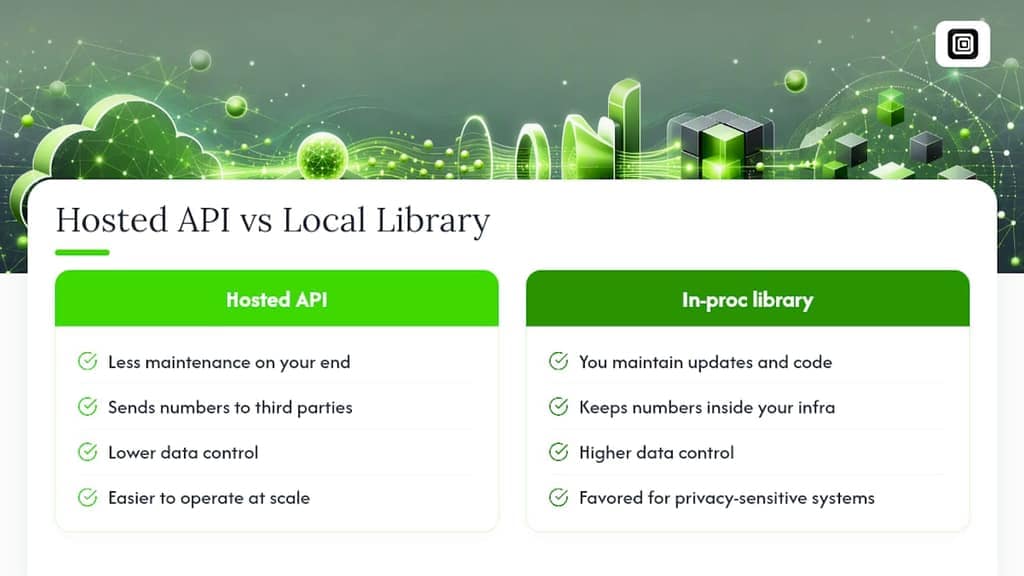
Whichever route you pick, numbering metadata needs regular updates. Country numbering plans change more often than most developers expect, and ITU guidance on numbering plan management explicitly warns against hard-coding rules that will eventually go stale.
How Should You Store Normalized Numbers in a Database?
Store more than one field. A single flattened string throws away information you'll need later for support, audit, and reparsing after a numbering plan change.
phone_e164: the canonical value, always starting with "+", never containing spaces, dashes, or an extension.extension: nullable string field for anything after "x" or "ext.", kept separate so it never pollutes the core number.raw_input: the original string exactly as the user or import file provided it, untouched.country_code: the detected ISO region (US, GB, IT), useful for reporting without re-parsing the E.164 string every time.normalized_tokens(optional): a JSON or structured breakdown of CC, NDC, and subscriber segments, if your queries need to filter by area code.
Enforce uniqueness on phone_e164, not on the raw field, and only after your confident normalization is running reliably. Enforcing it too early, before you've handled every legacy format, will throw false-positive constraint violations during migration.
For indexing, a straightforward B-tree index on phone_e164 handles exact-match lookups fine. If your application needs partial matching (searching by area code fragment), a trigram index on the same column performs far better than LIKE '%[555%](https://medium.com/swlh/performance-optimisation-for-wildcards-search-in-postgres-trigram-index-80df0b1f49c7)' scans on large tables.
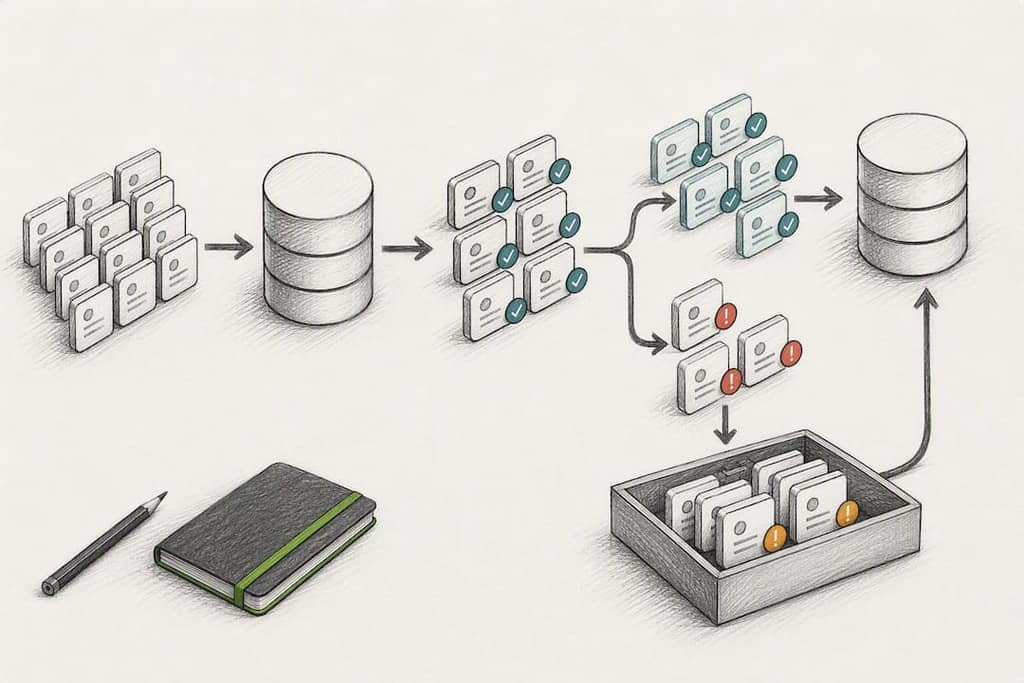
Pro Tip: Migrate legacy data in batches with a dry-run flag first. Log every record that fails to parse instead of skipping it silently, then review the failure list before running the real update.
How Do You Test and Monitor a Normalization Pipeline?
Build a fixed set of test vectors before writing pipeline code, not after. Include international formats ("+44 20 7946 0958"), domestic formats with trunk prefixes ("020 7946 0958"), vanity numbers ("1800FLOWERS"), numbers with extensions, and at least one deliberately malformed input per category.
Use isPossibleNumber as a fast first-pass filter and isValidNumber as the real gate before saving a record as confirmed. When a number fails isValidNumber, don't reject it outright. Route it to a "needs review" state instead, since a valid vanity or newly issued number can legitimately fail an outdated check.
Watch these signals once the pipeline is live:
- Failure rate by country, since a spike usually means that country's numbering plan changed.
- Volume of records stuck in "needs review" status over time.
- Alerts tied to your library's metadata release notes, so you know when to update.
- Ambiguous-country cases that had to fall back to a default region.
What Should a Launch Checklist Look Like?
Rolling out normalization across an existing dataset is riskier than adding it to a greenfield project, because every legacy record has to survive the transition without silent data loss.
- Set a metadata update cadence (monthly or tied to library release notes) and automate the check.
- Decide your privacy posture explicitly: local library or hosted API, and document why.
- Add normalization unit tests to your ingestion pipeline's CI suite, not just as a one-off script.
- Write a migration plan for legacy numbers, including a dry run and a rollback path.
- Define a monitoring SLA for failure-rate spikes and assign someone to own remediation.
Pro Tip: Run the migration against a read replica first if your table is large. A bad regex on a production write path is how "quick cleanup scripts" turn into incident reports.
What Matters When You Choose an Approach
Correctness, privacy, and maintenance cost pull in different directions, and most teams pick a strategy without admitting that trade-off exists. If you're handling customer data at any real scale, a local library beats a hosted API on privacy grounds alone. Sending phone numbers to a third-party endpoint means sending correlated personal data somewhere you don't control, and that's a bigger liability than most quick-start guides let on.
Hosted normalization APIs earn their place when a team genuinely lacks the bandwidth to track library updates. That's a legitimate trade, not a shortcut.
What I'd push back on is treating numbering metadata as a "set it and forget it" dependency. Country numbering plans are living documents. Bake an update check into your release cycle, and always keep the raw input around. You will eventually need to re-run normalization on old data, and you cannot re-derive a raw phone number from a canonical one you've already thrown away.
— Elias Mahdavi
Where Does the Contact Data Come From in the First Place?
Normalization only works on numbers you actually have, and pulling them out of chat apps and CRMs cleanly is its own problem. Mastros solves the collection half: its Chrome extensions run entirely inside your browser, reading what your own signed-in WhatsApp Web or Telegram session already shows, and exporting it to CSV, JSON, or JSONL. Nothing gets uploaded to a Mastros server, no API keys, no second login, and no automation touching your account.
That matters for normalization work specifically, because CSV and JSON exports drop straight into a sanitize-and-parse pipeline without a conversion step. The WhatsApp Scraper pulls group members and your full contact list, while the Telegram Scraper handles group members and recent contacts, both in formats ready for a normalization script. Start on the Free plan to test an export, then move to Pro at $9 a month or Scale at $18 a month once your volume needs grow.
Where to Verify These Standards Yourself
- ITU-T Recommendation E.164: the source standard defining the 15-digit limit and country code structure.
- ITU-T Recommendation E.161: keypad letter-to-digit mapping used for vanity number conversion.
- RFC 3966: the tel: URI syntax for formatting numbers in apps and web contexts.
- google/libphonenumber on GitHub: the reference implementation and its Java, JavaScript, and Python ports.
Sources
FAQ
How Should a Phone Number Be Formatted?
For storage and system-to-system use, format it in E.164: a leading "+", the country code, and the subscriber number, with no spaces or punctuation. Save any extension in a separate field rather than appending it to the number itself.
What Counts as an Incorrectly Formatted Phone Number?
Any number stored with inconsistent punctuation, a missing or wrong country code, or a trunk prefix left in place when it should have been converted to international format counts as incorrectly formatted. Numbers mixing digits from non-European numeral systems without conversion also fail validation checks.
How Do You Properly Format Your Own Phone Number?
Add your country code if it's missing, drop the domestic trunk prefix (with country-specific exceptions like Italy), and remove spaces or dashes so the result reads as "+" followed by digits only. A library like libphonenumber automates this and flags whether the result is a valid number for its region.
What Do the Middle Digits of a Phone Number Mean?
In most national numbering plans, the digits right after the country code form the national destination code, often called an area code, which routes the call to a specific region or carrier. The digits after that make up the actual subscriber number, and both segments vary in length by country.
What's the Fastest Way to Collect Raw Contact Numbers Before Normalizing Them?
Exporting directly from the platform where the numbers already live avoids manual copy-paste errors. Extensions like Mastros's WhatsApp Scraper export contact lists to CSV or JSON, which then feed straight into a normalization pipeline.