



The fastest practical route is simple: use an in-browser exporter for public profiles, an authenticated browser extension for private accounts you already follow, and Meta's approved research tools only if you're running an institutional study. Most exports land in CSV, Excel, or JSON. And one thing to keep in mind before you start: a public profile isn't blanket permission to reuse that data for marketing.
TL;DR:
- Exporting private follower lists requires logged-in access to the account, with extensions processing data locally to protect session privacy.
- Large accounts necessitate paced, segmented exports with deliberate pauses to avoid Instagram's rate limits and potential blocks.
- Exported files typically include public profile details like username, bio, and follower count, but never private data such as email addresses or phone numbers.
- Conducting lawful data collection involves defining clear purposes, establishing legal basis, setting retention periods, and documenting provenance before reuse.
- For project-scale research, using Meta's approved tools is safer and more compliant than relying on quick online web tools or anonymous exports.
Table of Contents
- Choosing your export method: extensions, web tools, or research access
- Step-by-step: exporting a public profile's follower list
- Exporting from private accounts you already follow
- What the export file actually contains
- Pacing your export around Instagram's rate limits
- Staying compliant: privacy checks before you export or reuse a list
- Turning a raw export into something useful
- Why local, in-browser exports are the practical middle ground
- A privacy-first option worth knowing about
- Where to check the rules yourself
- Sources
- FAQ
Choosing your export method: extensions, web tools, or research access
Not every job calls for the same tool. Here's how to match the method to the task.
- Manual copy works fine for a quick check of ten or twenty accounts, but it doesn't scale and it's easy to mistype a username.
- Browser extensions run locally, keep your session private, and typically capture more fields (bio, follower counts, verification status) than a quick copy-paste ever could.
- Anonymous web tools are convenient for small public lists, though many cap the number of rows or throttle speed without warning.
- Meta's Content Library and Content Library API exist for approved researchers running large-scale, reproducible studies, not for everyday lead generation or marketing lists.
If you're vetting a handful of influencer accounts before a campaign, a browser extension gets you a clean file in minutes. If you're building a dataset for a university project that needs to hold up to peer review, the research route is the correct, if slower, choice.
Step-by-step: exporting a public profile's follower list
Exporting from a public account is a straightforward process once you know the order of operations.
- Copy the profile URL and decide which fields matter to you: username, bio, follower count, and verification badge cover most use cases.
- Open your chosen in-browser exporter and confirm it runs locally, meaning the data never leaves your machine before you download it.
- Start the export and watch the progress indicator. Large lists take longer, so let the run finish rather than closing the tab early.
- Download the file and open it in Excel or a plain text editor to confirm the rows match what you expected.
Interrupted runs are the most common headache. If a page reloads mid-export or your connection drops, you'll often get duplicate rows or a truncated file. Re-running the export and deduplicating by username afterward usually fixes it.
Pro Tip: Run a test export on a small public account first, so you know what a complete file looks like before you trust the numbers on a bigger one.
Exporting from private accounts you already follow
Private follower lists are only visible if you're logged in and already have permission to view them. That authentication step is not optional, and it changes what you need to check before running an export.
- Confirm you're signed into the account that has viewing access. There's no workaround for accounts you don't follow.
- Prefer extensions that process everything locally rather than routing your session through a third-party server.
- Read the extension's stated permission scope before granting access. It should say clearly what it reads and what it never touches.
- Keep a short record of where the file came from and set a date by which you'll delete it if you no longer need it.
Skipping that last step is how old exports pile up on a hard drive with no one remembering why they exist.
What the export file actually contains
Most exports settle into a predictable shape, and knowing it in advance saves you from expecting fields that were never there.
- Common fields: username, display name, profile URL, bio text, follower count, verification flag, and a collection timestamp.
- CSV or Excel suits manual review and spreadsheet filtering; JSON suits anyone piping the file into a script or database.
- Add a unique identifier and a timestamp column to every export, since that pairing is what makes later enrichment or matching safe.
- What you won't get: email addresses, phone numbers, or any private detail the profile doesn't display publicly. If a tool promises those from a public profile, that's a red flag, not a feature.
Pacing your export around Instagram's rate limits
Instagram throttles both anonymous and logged-in reads once you push past a certain volume, and that limit is the main thing that separates a five-minute job from a multi-hour one. Accounts with a modest number of followers tend to finish quickly. Larger accounts often need segmented, paged runs with deliberate pauses between batches.
Plan for that instead of fighting it: break big exports into batches, log the timestamp of each one, and build in delays so the platform doesn't flag the activity. If you do get blocked, the right move is to pause and retry later rather than pushing harder, or to switch to sanctioned research access if the project is institutional in scale.
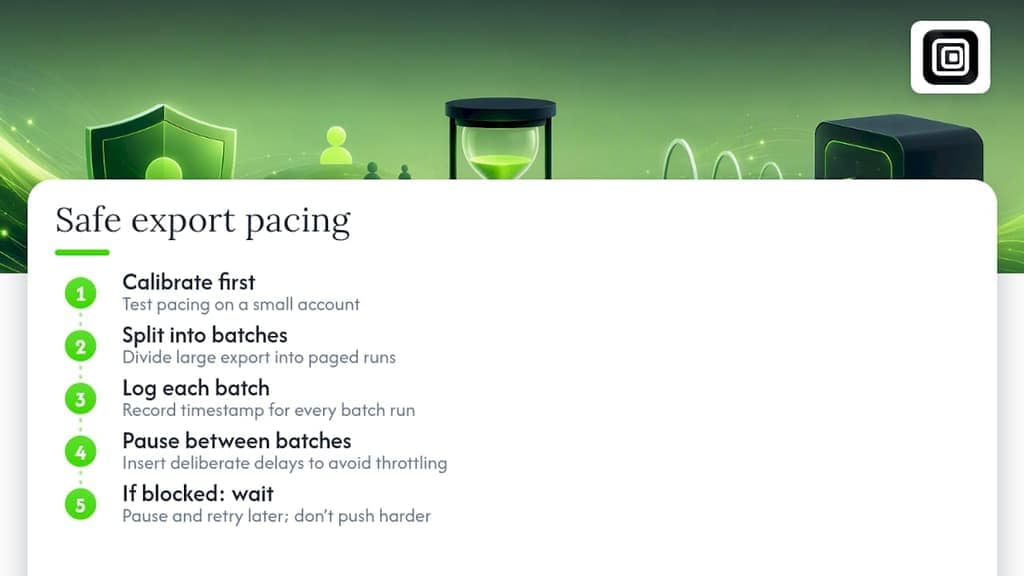
Pro Tip: Calibrate your pacing on a small account before you attempt a five-figure follower list. It tells you how fast is too fast without burning a real target.
Staying compliant: privacy checks before you export or reuse a list
Public doesn't mean unregulated. The ICO's guidance on collecting information for lead generation is explicit that a public Instagram profile can still count as personal data, and that visibility alone doesn't mean someone expects their details reused for marketing.
Before you export or reuse a follower list, work through this sequence:
- Define your purpose for collecting the data and write it down before you start.
- Establish a lawful basis for processing it, and don't assume "it was public" counts as one on its own.
- Set a retention period and stick to it. Data with no expiration date is a liability, not an asset.
- Document provenance: the profile, the collection date, and the fields you exported.
- If you plan to upload the list to an ad platform for matching, treat that hashing and matching step as processing in its own right, keep clear records of who's responsible for what, and be ready to explain it if asked.
That last point trips up a lot of people who assume hashing makes a list anonymous. It doesn't remove the obligations; it just changes the format.
Turning a raw export into something useful
A follower list is a snapshot, not a fixed audience, so treat the collection date as part of the data rather than an afterthought.
- Timestamp the export and revisit it periodically rather than treating one file as permanent.
- Clean it first: dedupe entries, drop deactivated or private accounts, and flag obvious bot patterns using simple heuristics like default avatars or zero posts.
- Enrich it deliberately: add engagement metrics, mutual-follow counts, or bio keyword tags, and use hashed identifiers if you need to match against another list safely.
- Match the tool to the size: Excel filters and pivot tables handle a few thousand rows fine, while Python or R makes more sense once you're merging multiple JSON exports.
Why local, in-browser exports are the practical middle ground
Follower exports sit at an odd intersection: useful for real research and marketing decisions, but easy to misuse if the data sits on someone else's server longer than it needs to. In-browser tools that read what your own session already displays, without uploading anything to a vendor's backend, cut out a whole category of third-party exposure. That's not a theoretical advantage; it's the difference between a file that stays under your control and one that doesn't.
For anyone who needs a structured file quickly, without adding an API key or a second login to the mix, that local-processing model is the more defensible default.
— Elias Mahdavi
A privacy-first option worth knowing about
If you'd rather not assemble your own workflow from scratch, Mastros' Instagram Follower Export & Scraper is built around the same principle covered above: everything processes in your browser, nothing uploads to a Mastros server, and exports land in CSV, JSON, or Excel depending on what your next step requires. It's launching alongside the same local-first approach Mastros already uses for its Telegram, WhatsApp, and LinkedIn extensions.
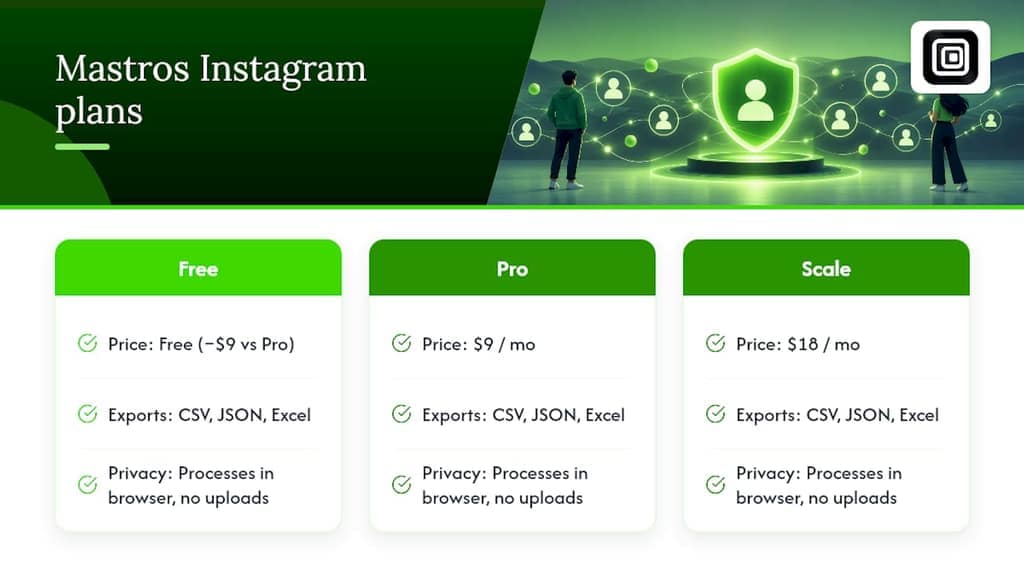
The Free plan is $9 a month cheaper than the Pro tier and a good way to see the output format before committing; Pro runs $9 a month and Scale runs $18 a month for higher export volumes. Check the Instagram product page for the details, or read the step-by-step CSV export guide if you want the full walkthrough first.
Where to check the rules yourself
- Meta's Content Library and API for approved research access and eligibility terms.
- ICO guidance on lead generation for public-data obligations.
- Related reading: is Instagram scraping legal and developer notes on API response testing for programmatic exports.
Sources
- Meta Content Library and API | ICPSR / SOMAR
- Collect information and generate leads | ICO
- Meta Content Library and API | Transparency Center
FAQ
Can I export Instagram followers without logging in?
You can export public follower lists without an account in some cases, but private accounts require you to be logged in with existing viewing permission. Anonymous access is also more likely to hit Instagram's rate limits sooner than an authenticated session.
What file formats can I export Instagram followers to?
Most tools support CSV, Excel, and JSON. CSV and Excel work best for spreadsheet review, while JSON suits anyone building an automated pipeline or merging multiple exports.
Will an Instagram follower export include email addresses?
No. A standard follower export only contains what a profile displays publicly, such as username, bio, and follower count, not email addresses or phone numbers.
Is it legal to export public Instagram follower data?
Exporting publicly visible data is generally permitted, but using it for marketing still requires a lawful basis and transparency under guidance from bodies like the ICO. Public visibility alone does not remove your data-protection responsibilities.
How long does it take to export a large follower list?
Accounts with a modest number of followers tend to finish quickly. Larger accounts often need segmented, paced runs to avoid rate limits. Institutional projects needing full-scale, reproducible data should use Meta's approved research tools instead of large anonymous exports.
Recommended
- How to Export Instagram Followers to CSV
- Track Instagram Followers and Unfollowers, No App
- Export Instagram Emails From Bios to CSV | Bulk, No API
- Scrape Instagram Profiles Without an API | 3 Ways (2026)