


Coming soon · in final testing
 YouTube · Chrome extensionComing soon
YouTube Transcript Generator
The YouTube transcript download tool that exports real files. Grab the transcript of any video, download subtitles and captions in every language the video has, search, sort and export comments, and export playlists to CSV for Excel or Sheets.
The launch beta starts free and unlimited for everyone. Join the waitlist and we'll email you the moment it's on the Chrome Web Store.
How it works
How it works
Install, open a video, export. Nothing runs on its own.
Add the extension
One click from the Chrome Web Store. No account, no login.
Open a YouTube video
Any video with captions. The Transcript button appears on the player.
Pick what to export
The transcript, a subtitle track, the comments or a playlist.
Save it or summarize it
TXT, SRT, VTT or CSV, or straight into your own ChatGPT, Claude or Gemini.
What you get
The transcript first, in every format you need, with subtitles, comments, playlists and tags behind it.
Transcript generator
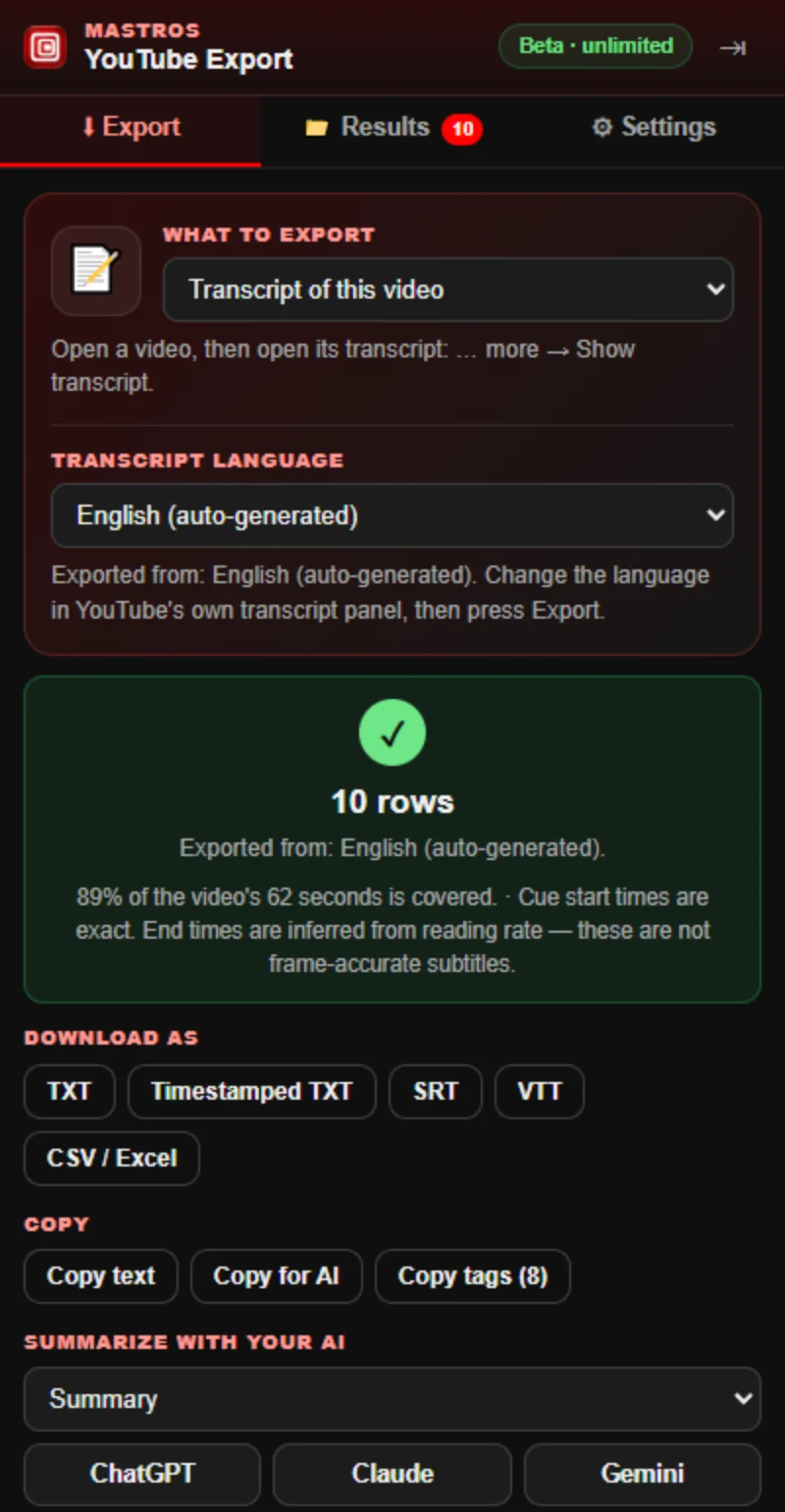
Download TXT, timestamped TXT, SRT, VTT or CSV in one click, or copy the text, with or without timestamps.
A Transcript button on the video
One click on the player opens the transcript and exports it.
Summarize with your own AI
Pick a summary, chapters with timestamps, study notes, a quiz, tags or a translation. One click copies it with the transcript and opens ChatGPT, Claude or Gemini. No credits, no account with us.
Search the transcript
Type a word, and click any matching line to jump the video to that moment.
Comment finder
Search loaded comments by keyword, @author, likes or replies, sort by most liked, pick a random comment for a giveaway, then export just the matches to CSV.
Subtitles and captions
Every track on the video, auto-generated or manual, one language at a time, and the file says which language it is.
Copy text and Copy for AI
Plain text, or the text with the title and channel on top, ready to paste anywhere.
Playlist length and export
Position, title, channel and duration for every video, with the total length and the time at 1.25× to 2×.
Copy video tags
A video's tags in one click, straight from the video itself.
Finishes or tells you why
Captions disabled, members-only, age-gated: you get a reason, never a silent empty file.
Why it's different
Your transcript, your AI, your computer
Mastros reads the transcript YouTube's own page already shows. It makes no request to YouTube, needs no login, and the file it writes stays on your computer. It exports text, never video or audio.
Summaries happen in the assistant you already use: Mastros copies the transcript with your prompt and opens ChatGPT, Claude or Gemini. No model runs on our side and there are no credits to buy. Subtitle start times are exact; end times are worked out from reading speed, and the panel says so.
Reviews
What people say
4.95 out of 5 from 152 reviews across all Mastros extensions on the Chrome Web Store. Read every review
I tested the extension and everything I tried worked smoothly chat messages exported successfully to csv, group members were well organized, and media was downloaded into a zip file i especially liked that it can find a member’s profile name when it isn’t shown in the group.
Works really well and saves me a lot of time when downloading Telegram videos and media. Simple, useful, and easy to use.
Building lead lists used to feel like an endless punishment of copy pasting profile URLs all afternoon.This extension detects search results instantly and pulls the whole batch into an excel file with clean aligned columns